These release notes detail the significant changes made between versions 8.8.0 and 9.0.0. For a complete list of changes, please refer to the Serenity Change Log.
New File Explorer Sample (StartSharp)
A new File Explorer sample is available in the Serenity demo:
https://demo.serenity.is/AppSamples/FileExplorer
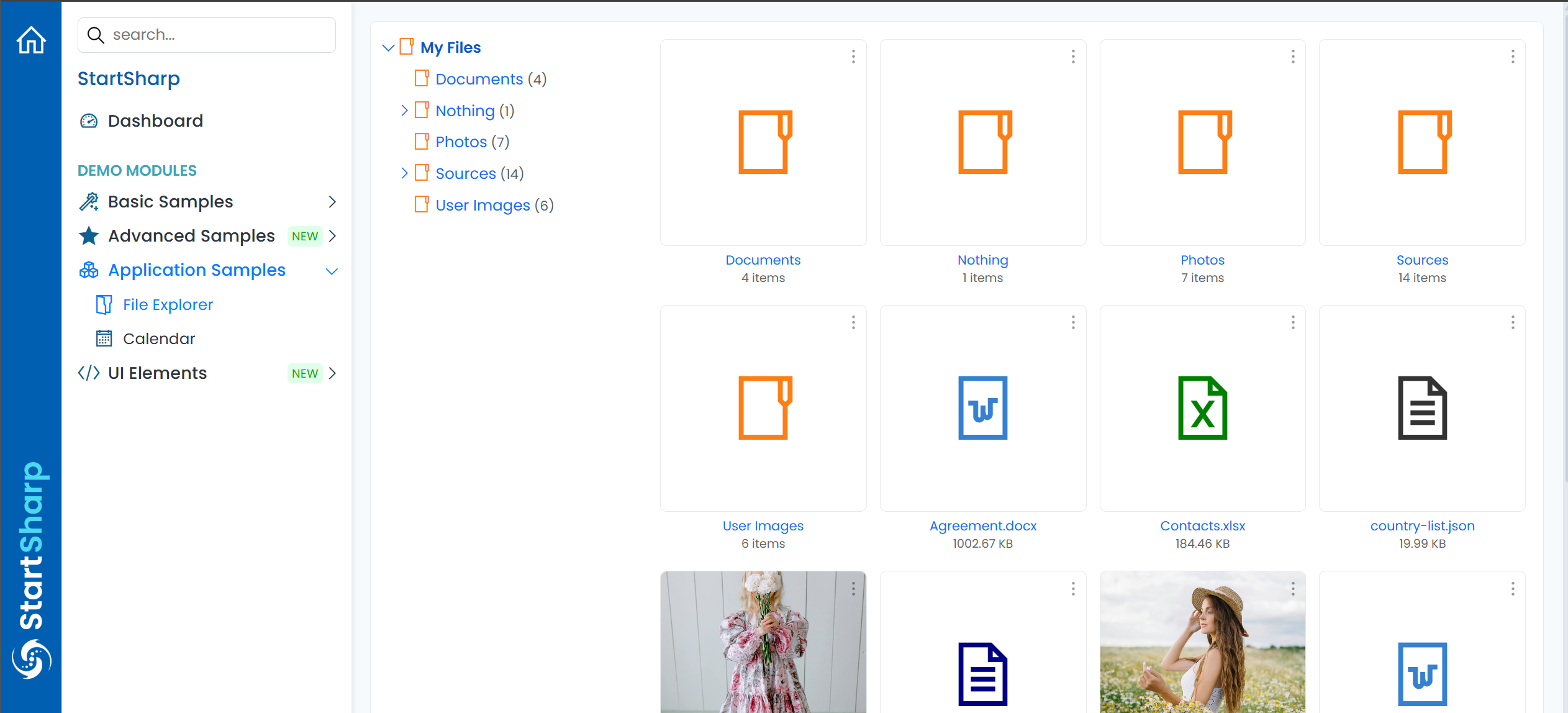
It is implemented with JSX and signals and demonstrates how to implement a custom application using Serenity. It has a file tree, thumbnails for images, a lightbox, dropdowns for file items, and can launch Office applications (if available) for Word, Excel, and other file types.
FullCalendar Integration Sample (StartSharp)
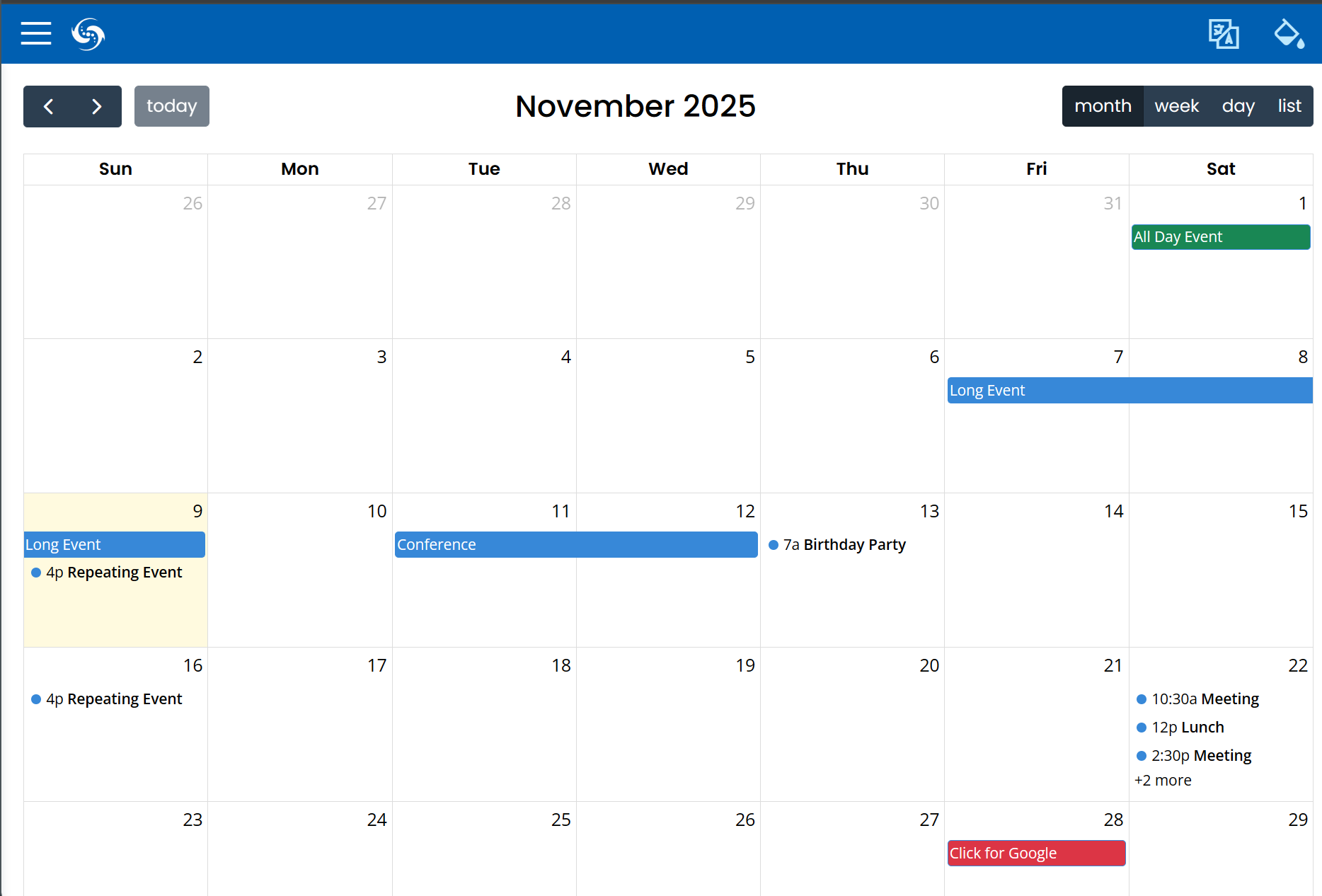
We now have a Calendar application sample in the Serenity demo that integrates the FullCalendar component (https://fullcalendar.io/).
https://demo.serenity.is/AppSamples/Calendar
New Type Registration System
Type registration via decorators (e.g., Decorators.registerClass, Decorators.registerEditor, etc.) is now deprecated (it still works but is not recommended):
import { Decorators, Widget } from "@serenity-is/corelib";

@Decorators.registerClass("MyProject")
export class MyType extends Widget<any> {
}
You may now use a static [Symbol.typeInfo] property declaration instead:
import { Widget } from "@serenity-is/corelib";

export class MyType extends Widget<any> {
    static [Symbol.typeInfo] =
        this.registerClass("MyProject.MyModule.MyType");
}
This new approach offers several advantages over decorators. Most importantly, decorator information is not emitted by TypeScript in declaration files (e.g., .d.ts), making it difficult or impossible to identify registration names for referenced project/npm package types.
Another reason for this change is a longstanding bug in esbuild (see issue) with decorators and property initializers, which currently only has a workaround by using experimentalDecorators: true in tsconfig.json.
The new registration methods also support passing interfaces or attributes as an array in the second argument. For example, to set @Decorators.panel(true) on a class, you can do:
import { Widget, PanelAttribute } from "@serenity-is/corelib";

export class MyType extends Widget<any> {
    static [Symbol.typeInfo] =
        this.registerClass("MyProject.MyModule.MyType",
            [new PanelAttribute(true)]);
}
Note: When using this new registration method, TypeScript will not allow any decorators on the containing type, as the this expression is referenced in a static field initializer. If you need to use third-party decorators, you can use an alternative registration style:
import { Widget, classTypeInfo, registerType } from "@serenity-is/corelib";

@someCustomDecorator("test")
export class MyType extends Widget<any> {
    static [Symbol.typeInfo] =
        classTypeInfo("MyProject.MyModule.MyType");
    static { registerType(this); }
}
This is equivalent to this.registerType, as the registerType static method in Widget calls classTypeInfo and registerType internally.
This style is also useful for formatter registration, as formatters typically do not have a base type and cannot simply call this.registerType like widget subclasses:
export class MyFormatter implements Formatter {
    static [Symbol.typeInfo] =
        formatterTypeInfo("MyProject.MyModule.MyFormatter");
    static { registerType(this); }
}
For consistency, you may also choose to extend the new FormatterBase class:
export class MyFormatter extends FormatterBase implements Formatter {
    static [Symbol.typeInfo] =
        this.registerFormatter("MyProject.MyModule.MyFormatter");
}
For all registration styles, you can now pass only the namespace ending with a dot (the enclosing type name will be auto-appended):
import { Widget } from "@serenity-is/corelib";

export class MyType extends Widget<any> {
    static [Symbol.typeInfo] = this.registerClass("MyProject.MyModule.");
}
Sergen / Serenity.Pro.Coder now also generates namespace constants under the Modules/ServerTypes/Namespaces.ts file, so you can use them to avoid typos:
import { Widget } from "@serenity-is/corelib";
import { nsMyModule } from "../../ServerTypes/Namespaces";

export class MyType extends Widget<any> {
    static [Symbol.typeInfo] = this.registerClass(nsMyModule);
}
We hope this will reduce mistakes when renaming classes or using a namespace with mismatched casing.
Split Insert/Update Log Interfaces
The IInsertLogRow interface, which included InsertUserIdField and InsertDateField properties:
public interface IInsertLogRow
{
    Field InsertUserIdField { get; }
    DateTimeField InsertDateField { get; }
}
is now split into IInsertDateRow and IInsertUserIdRow sub-interfaces:
public interface IInsertDateRow
{
    DateTimeField InsertDateField { get; }
}

public interface IInsertUserIdRow
{
    Field InsertUserIdField { get; }
}

public interface IInsertLogRow : IInsertDateRow, IInsertUserIdRow
{
}
Similarly for IUpdateLogRow:
public interface IUpdateDateRow
{
    DateTimeField UpdateDateField { get; }
}

public interface IUpdateUserIdRow
{
    Field UpdateUserIdField { get; }
}

public interface IUpdateLogRow : IUpdateDateRow, IUpdateUserIdRow
{
}
This provides the ability for rows to store only the date or the user during logging, if desired.
If you explicitly implemented these interfaces in some of your rows without subclassing LoggingRow and referenced the specific row interface like this:
class SomeRow
{
    DateTimeField IInsertLogRow.InsertDateField => Fields.InsertDate;
    Field IInsertLogRow.InsertUserIdField => Fields.InsertUserId;
    DateTimeField IUpdateLogRow.UpdateDateField => Fields.UpdateDate;
    Field IUpdateLogRow.UpdateUserIdField => Fields.UpdateUserId;
}
you may get an error. You will need to replace the interface references:
class SomeRow
{
    DateTimeField IInsertDateRow.InsertDateField => Fields.InsertDate;
    Field IInsertUserIdRow.InsertUserIdField => Fields.InsertUserId;
    DateTimeField IUpdateDateRow.UpdateDateField => Fields.UpdateDate;
    Field IUpdateUserIdRow.UpdateUserIdField => Fields.UpdateUserId;
}
New Grid EditLink Helper
If you wanted to add an edit link which opens the edit form for a particular record, you simply add the [EditLink] attribute:
public class SomeColumns
{
    [EditLink]
    public string Description { get; set; }
}
This is handled behind the scenes by the grid to wrap the column's formatter output with an anchor element:
<a class="s-EditLink s-MyGrid-DescriptionLink"
    href="#MyGrid/ALFKI"
    data-item-type="MyGrid"
    data-item-id="1234">Some Description</a>
It uses the itemLink function defined in the DataGrid class which in turn calls SlickFormatting.itemLink helper:
protected itemLink(itemType?: string, idField?: string,
    text?: Format<TItem>,
    cssClass?: (ctx: FormatterContext) => string,

    encode: boolean = true): Format<TItem> {
        return SlickFormatting.itemLink( // ...
        );
    }
The itemType and idField default to the entity grid's own values, but it is possible to pass different values to open another entity dialog.
For historic reasons, the arguments of this function are not very intuitive, though it is rarely used directly as most usage happens through the [EditLink] attribute.
We now provide a new EditLink function that accepts a props option:
public EditLink = (props: {
    /** formatter context (contains item, value etc) */
    context?: FormatterContext,
    /** The id of the entity to link to.
        * If not provided it will be taken from ctx.item[idField] */
    id?: string,
    /** The name of the field in item that contains the entity id.
        * Defaults to idProperty. Used if id is not provided. */
    idField?: string,
    /** The item type to link to. Defaults to this.getItemType() */
    itemType?: string,
    /** Extra CSS class to add to the link element
        * besides s-EditLink. Optional. */
    cssClass?: string,
    /** Tab index to add to the link element. Optional. */
    tabIndex?: number,
    /** The link text. If not provided it will be taken
        * from ctx.escape(ctx.value) */
    children?: any
}): any => {
which can also be used in JSX contexts:
protected override getColumns() {
    const columns = new OrderDetailColumns(super.getColumns());
    columns.ProductName.format = ctx => <this.EditLink context={ctx} />
    return columns.valueOf();
}
Again, it is still recommended to use the [EditLink] attribute but this helper might be useful for formatters where edit links might be generated conditionally or alongside other elements.
Inline Editing Improvements and Inline Grid Editor Sample
We have now introduced an inline grid editor sample (e.g. for classes deriving from GridEditorBase):
https://demo.serenity.is/AdvancedSamples/InlineGridEditor
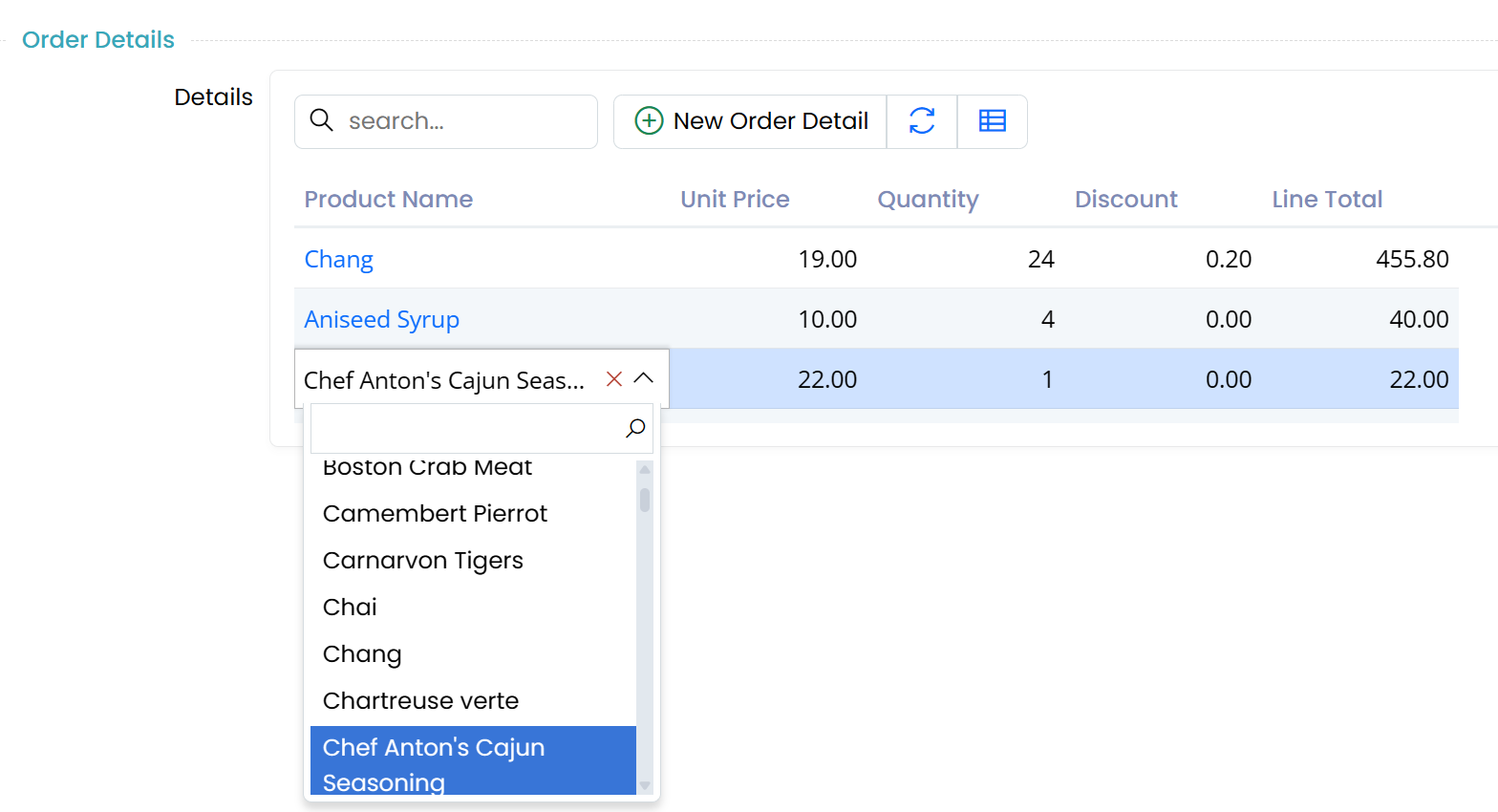
It was possible to use inline editing for in-memory grids, but as it was configured to work with server-side services by default, it was not very clear at first glance.
Inline editing in this sample works in memory for the New Order dialog, while it works directly with the server (e.g. saves every change) for the Edit Order dialog (connected mode). This demonstrates that it is possible to configure inline editing both for in-memory and connected modes.
There are also several new options for the GridEditController:
getPropertyItemcallback to optionally override the property item corresponding to a particular cell (row/column). This might allow using different editors or editing properties for different rows.saveHandleralso receives a secondaryargsargument with adefaultHandlerproperty, allowing you to call the default save handler when needed.bulkSaveHandlerwhich allows you to override logic for bulk update operations.
Containing Folder Names of Several Projects are Changed
The following folder names which are located under Serenity/src/ have been renamed:
Serenity.Net.Core/=>core/Serenity.Net.Services/=>services/Serenity.Net.Web/=>web/
The following common-features project folders:
Serenity.Demo.BasicSamples/=>demo.basicsamples/Serenity.Demo.Northwind/=>demo.northwind/Serenity.Extensions/=>extensions/
The folder names of pro-features projects have also been changed similarly. Please see the premium repository.
This change should not affect you unless you are using Serenity as a submodule. So, the users of NuGet packages have nothing to worry about.
GitHub Source Links for Samples Are Updated to Use the Corresponding Release Commit ID
You may see source links on demo pages which take you to the corresponding source file(s) on GitHub for the demo page:
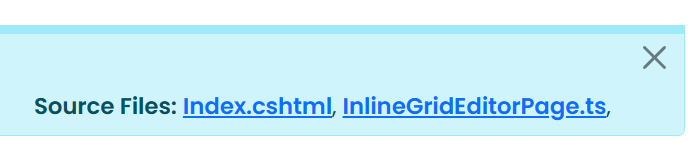
They were originally pointing to the master branch, so when the folder structure or filename changes the link might get broken. Also, as it was showing the latest version, it was not possible to see the state of a demo source at the version in use.
The links now take you to the particular commit the demo is released for. This should fix the broken links and allow you to see the source code as at the point it was released.
Note that this will only affect the demo projects that are version >= 9.0.1.
New Html.CspNonce Helper
We have now introduced a new Html.CspNonce() helper which can be used to generate a nonce to be applied to script and CSS includes and specified in the Content-Security-Policy header.
Note that as CSP can be limiting for some applications, it is not enabled by default in Serene/StartSharp. There is a commented out Content-Security-Policy meta element in _LayoutHead.cshtml which you should adjust to your needs and uncomment to enable CSP if you wish:
@*<meta http-equiv="Content-Security-Policy" content="base-uri 'self'; default-src 'self'; ..." />*@
New Interface Source Generator
For service request handlers we normally define a corresponding interface to abstract the operation and use it in service endpoints instead of the concrete implementation type:
using MyRow = Serenity.Pro.WorkLog.WorkLogRow;

namespace Serenity.Pro.WorkLog;

public interface IWorkLogAssignToInvoiceHandler : IRequestHandler
{
    ServiceResponse AssignToInvoice(IUnitOfWork uow, WorkLogAssignToInvoiceRequest request);
}

public class WorkLogAssignToInvoiceHandler(...) : IWorkLogAssignToInvoiceHandler
{
    public ServiceResponse AssignToInvoice(IUnitOfWork uow, WorkLogAssignToInvoiceRequest request)
    //...
}
When we modify some argument or type in the handler type we should also modify the arguments or types of the interface which could be tedious work.
We now provide a source generator that will generate the code for the interface automatically:
namespace Serenity.Pro.WorkLog.RequestHandlers;

[GenerateInterface]
public class WorkLogAssignToInvoiceHandler() : IWorkLogAssignToInvoiceHandler
{
    public ServiceResponse AssignToInvoice(IUnitOfWork uow, WorkLogAssignToInvoiceRequest request)
    //...
}
Note the [GenerateInterface] attribute that triggers the source generator.
We also moved the request handlers to .RequestHandler namespace so that they will not show up in IntelliSense in endpoints etc. The generated interface will use the namespace without .RequestHandlers suffix, e.g. for the sample above, the namespace for the interface will be Serenity.Pro.WorkLog.
New npmCopy Feature in TSBuild
There may be cases where you would like to include a script or style file under node_modules, for example to use it in appsettings.bundles.json. It is not possible to reference files under node_modules directly, as the static files under node_modules are not available to public consumers. Only the files under wwwroot are served by default. You could theoretically serve node_modules by using the static files provider but it is not recommended as the folder would be too big and node_modules won't be available in a published application normally.
For this reason, we provide several static scripts like Bootstrap via Serenity.Assets so that you could use them in appsettings.bundles.json. Another way is to use a tool like libman.
Now we provide another option via tsbuild's new npmCopy helper:
import { build, npmCopy } from "@serenity-is/tsbuild";

npmCopy([
    "some/path/to/file.js"
])
Which copies node_modules/some/path/to/file.js to wwwroot/npm/some/path/to/file.js along with any accompanying .min.js file.
It is not necessary to execute npmCopy manually in most cases, as tsbuild now calls it automatically for entries starting with ~/npm/ in appsettings.bundles.json:
{
  "CssBundling": {
    "Bundles": {
      "Base": [
        //...
        "~/npm/flatpickr/dist/flatpickr.css",
        "~/npm/glightbox/dist/css/glightbox.min.css",
        //..
      ]
    }
  },
  "ScriptBundling": {
    "Bundles": {
      "Base": [
        //...
        "~/npm/glightbox/dist/js/glightbox.min.js",
        //...
      ]
    }
  }
}
So, just npm install the library with static scripts and CSS files you need, include necessary paths in appsettings.bundles.json (prefix with ~/npm/ instead of node_modules/) and tsbuild will take care of the rest.
You may only need to call npmCopy for any script or style file that you use in other places like a Page.cshtml file that has a particular script include for that page only.
Several Legacy / Third Party Scripts are Removed from Serenity.Assets
As jquery is no longer necessary, we removed the following third party scripts from Serenity.Assets:
- jquery.colorbox (prefer glightbox from npm; we use it in StartSharp now)
- jquery.cookie
- jquery.event.drag
- jquery.maskedinput
- jquery-ui
- jquery-ui-i18n
- jspdf (if not available in global/window, PDFExportHelper will try to load it from CDNJS by default)
- jspdf.autotable (if not available in global/window, PDFExportHelper will try to load it from CDNJS by default)
If you still need these legacy scripts (e.g. in appsettings.bundles.json) you may install them via npm / libman.json or use them via CDN.
Also removed ckeditor from Serenity.Assets. HtmlContentEditor will load it (v4.22.1) from CDNJS by default. Please remove line HtmlContentEditor.CKEditorBasePath = "~/Serenity.Assets/Scripts/ckeditor/" from ScriptInit.ts.
It is Recommended to Add BeforeTargets="ResolveProjectStaticWebAssets" to the RunTSBuild Target
Due to some changes in .NET9+ Static Web Assets SDK, build and publish may sometimes fail as esbuild might create / delete some files after the SDK discovers static assets.
Please modify your RunTSBuild target to include a BeforeTargets as shown:
<Target Name="RunTSBuild" BeforeTargets="ResolveProjectStaticWebAssets" ...>
The line below can be removed after this change:
<GenerateComputedBuildStaticWebAssetsDependsOn>RunTSBuild...
The experimentalDecorators Option Should be Set Back to true
As esbuild has an unresolved bug with decorators and initializers (https://github.com/evanw/esbuild/pull/4092) you may have script errors unless you set "experimentalDecorators": true in tsconfig.json. Unfortunately, so far the esbuild author has not provided any fix or reaction to this issue even though we created pull requests with a fix.
Although the new type registration system which does not depend on decorators should remedy this issue, if you use decorators in existing code it is still recommended to set this flag to true.
Support for Partial Row Properties
If you are targeting .NET 9 SDK (instead of .NET 8), Sergen and Pro.Coder now support partial row field getter / setters. E.g. instead of:
public sealed partial class LanguageRow : Row<LanguageRow.RowFields>
{
    public string LanguageName { get => fields.LanguageName[this]; set => fields.LanguageName[this] = value; }
}
You may now write:
public sealed partial class LanguageRow : Row<LanguageRow.RowFields>
{
    public partial string LanguageName { get; set; }
}
And Sergen will generate the accessors automatically.
New Localization UI and List Service / Dropdown Localization
Added a FieldLocalizationListBehavior to support localization during list requests. Currently, only ServiceLookupEditor can display localized dropdowns:
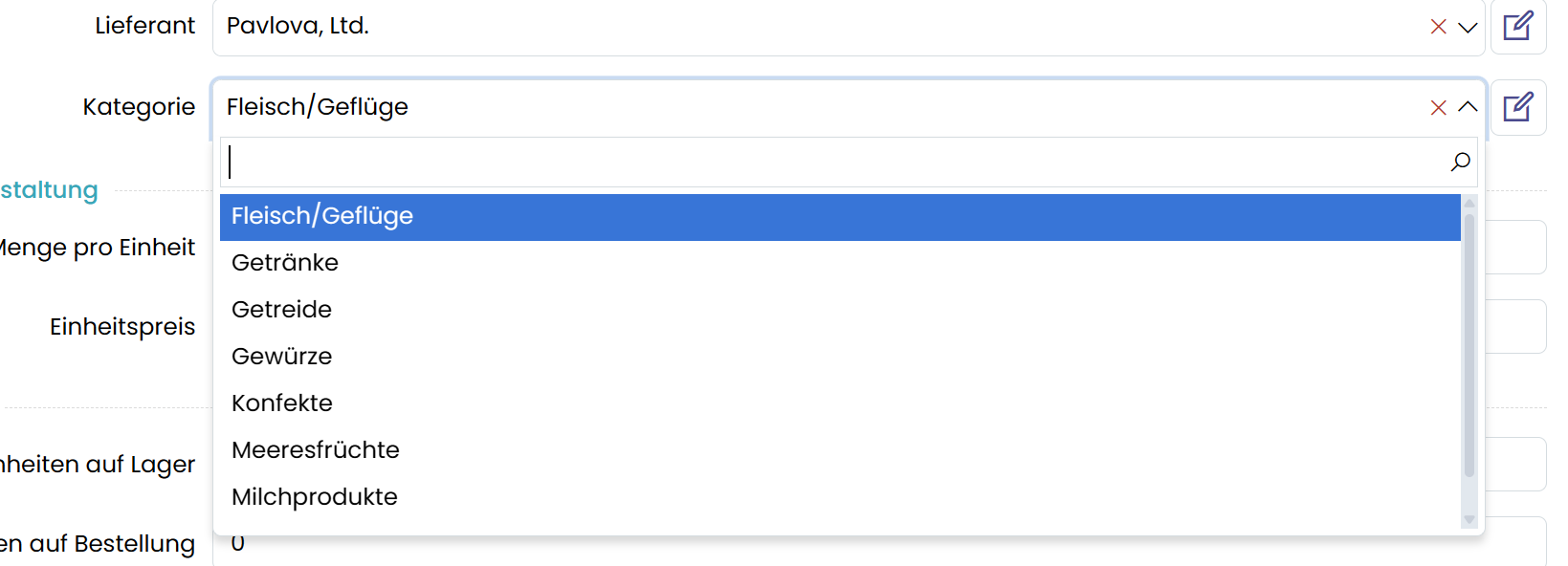
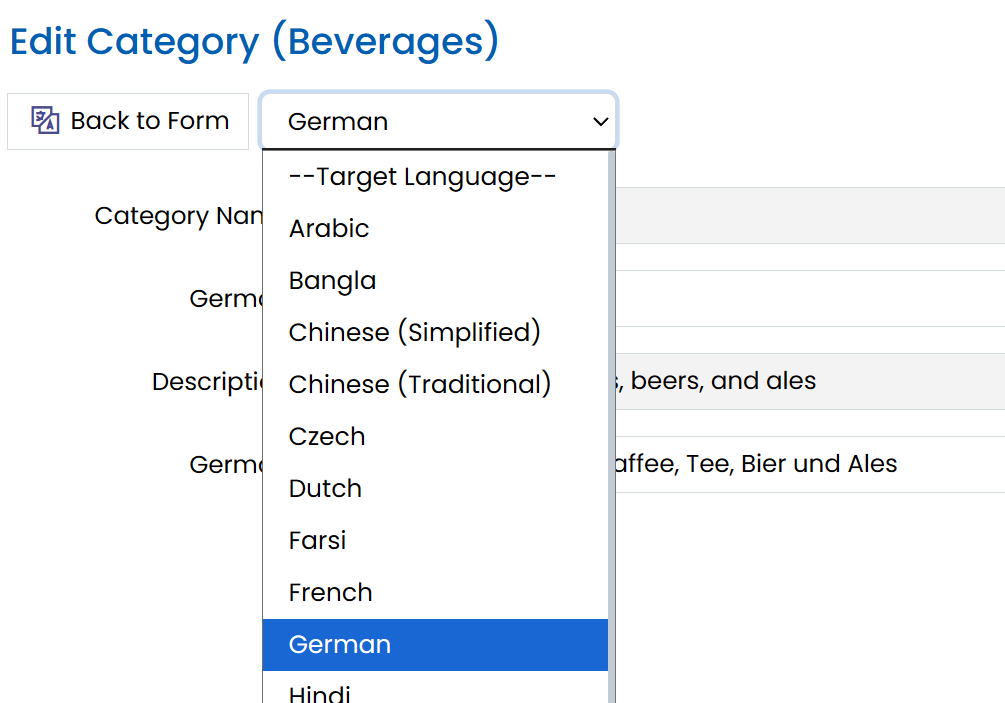
Enhanced localization UI by adding a dropdown to select the target language, displaying inputs for the selected language only. The selection persists in local storage:
Switched to ClosedXML
We transitioned from EPPlus to ClosedXML due to licensing issues and lack of updates to the free open source version of EPPlus. The change primarily affects ExcelReportGenerator users, with updates to helper function arguments and return types (e.g., XLWorkbook instead of ExcelPackage).
The only impacted screen was the ProductExcelImport sample. Other Excel export and report functionalities remain unaffected.
If EPPlus is still required, manually add its reference and retain a copy of the old ExcelReportGenerator.
IRowOperationInterceptor and ISqlOperationInterceptor
It is now possible to intercept some SQL operations done through SqlHelper (connection.ExecuteReader, connection.ExecuteNonQuery etc.) and EntityConnectionExtensions (connection.TryById, connection.InsertAndGetID etc.) by implementing ISqlOperationInterceptor and/or IRowOperationInterceptor in the mock connection class.
This is especially useful for unit testing. See how we use it in our tests in Serenity.Net.Tests:
EntityConnectionExtensions_ById_Tests.cs
New AddApplicationPartsFeatureToggles Extension
The new services.AddApplicationPartsFeatureToggles can be used in Startup instead of services.AddFeatureToggles.
services.AddApplicationPartsFeatureToggles(Configuration);
services.AddApplicationPartsTypeSource();
This also scans enum types with [FeatureKeySet] attribute in application parts, and disables features that have a [DefaultValue(false)] attribute on them by default.
It also discovers dependencies between features themselves (for example a DataAuditLog_Services sub feature might depend on a DataAuditLog feature, e.g. disabling it also disables all sub features) so it is recommended to switch to AddApplicationPartsFeatureToggles.
We also added the ability to declare dependencies between feature flags themselves by adding [RequiresFeature] attribute to the FeatureKeys enum members, or the enum itself:
namespace Serenity.Pro.DataAuditLog;

[FeatureKeySet]
[RequiresFeature(DataAuditLog)]
public enum FeatureKeys
{
    DataAuditLog,
    DataAuditLogBehaviors,
    DataAuditLogEndpoints,
    DataAuditLogHandlers,
    DataAuditLogMigrations,
    DataAuditLogPages
}
Here all the feature flags defined in this FeatureKeys enum depend on the DataAuditLog feature. So, by setting DataAuditLog to false, all of them will be disabled.
We have also added a new argument (disabledByDefault) to AddFeatureToggles method to pass a list of feature toggle keys (enums or strings) to disable by default without having to set in configuration. The default will be used if the flag is not specified in the configuration, e.g. it will not override the configuration setting. It is also possible to pass ["*"] to disable all features by default, but is not recommended as it would mean when we add a new feature flag in the future (not necessarily a new feature, just a new toggle to disable some part of a feature), all users would have to enable it manually in configuration.
New Default Set of Global Usings For Serenity
We now automatically add common namespaces like System.Collections.Generic, Serenity, Serenity.ComponentModel etc. to usings from Serenity.Net.Web.targets (e.g. any project referencing Serenity.Web package) unless SerenityUsings property is explicitly set to false in the project. This means most Using items from StartSharp/Serene projects might be removed.
Package Mergers:
Serenity.Net.DataandSerenity.Net.Entitypackages are now merged intoSerenity.Net.Services. Remove references to these packages and updateTypeSourceimplementations accordingly. Switching toApplicationPartsTypeSourceis recommended.Serenity.Pro.DataAuditLogandSerenity.Pro.EmailQueueare merged into theSerenity.Pro.Extensionspackage. Remove their assembly references if using a classic type source.Serenity.Pro.Themepackage contents are merged intoSerenity.Pro.Extensions. Update references inappsettings.bundles.json:- Replace
~/Serenity.Pro.Theme/pro-theme.jswith~/Serenity.Pro.Extensions/pro-theme.js. - Replace
~/Serenity.Pro.Theme/pages/dashboard.csswith~/Serenity.Pro.Extensions/pages/dashboard.css. - Replace
~/Serenity.Pro.Theme/pro-theme{.rtl}.csswith~/Serenity.Pro.Extensions/pro-theme{.rtl}.css. - Remove
~/Serenity.Pro.Extensions/pro-extensions{.rtl}.css, as it is merged intopro-theme.css.
- Replace
Serenity.Pro.Organizationis merged intoSerenity.Pro.Meeting. Remove its references from your project andTypeSource.