Localization
Most web applications have to support a variety of languages. Sites like Youtube, and Wikipedia work in many languages.
The first time a user visits such a site, a language for her is automatically chosen depending on the browser language setting which is usually determined by the OS language and regional settings.
If the automatic selection does not result in what they expect, users can set their preferred language and this selection is stored in a client-side cookie or a user profile table.
Once a language is chosen, all texts are displayed in the selected language.
The Serenity platform is designed with localization in mind from the start.
You may see this yourself by setting your browser language or changing the language under the language dropdown of the Serenity demo (https://demo.serenity.is).
If you change to Turkish for example; and refresh your browser, you would see the demo in Turkish:
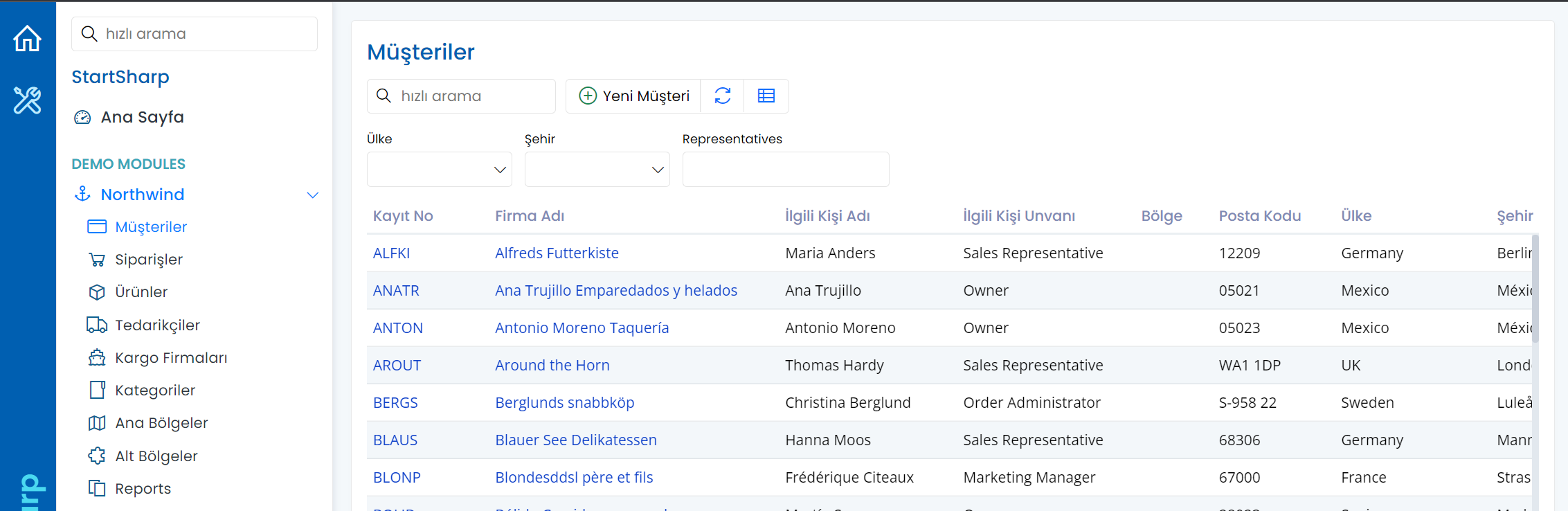
Here, the data is not translated but it is also possible to translate the user-entered data by some methods like culture extension tables.
Localization in .NET itself
.NET applications generally use string resource files (.resx) and satellite assemblies:
The localization system in .NET works fine for most applications. The main problem we see with satellite assemblies is that they require a compilation step and it is not very suitable for translation by third parties and adding new languages or editing translations after the application itself is deployed.
Localization in Serenity
Serenity uses a custom localization system to get the potential advantages below:
- Add/remove the available languages from the application itself
- Edit the localizations at run time, so that it can be done by third parties like a translator
- Store/distribute translations as JSON files
- Store translations in another medium such as a database if desired
ITextLocalizer Interface
Localization starts with the ITextLocalizer interface:
public interface ITextLocalizer
{
    string TryGet(string key);
}
This is a very simple interface that only has a TryGet method which provides the ability to retrieve a translation for the current UI language (CultureInfo.CurrentUICulture) by its text key.
DefaultTextLocalizer and TextLocalizerExtensions
The default implementation of ITextLocalizer is DefaultTextLocalizer, which resolves translations from an ILocalTextRegistry using the current UI culture:
public class DefaultTextLocalizer(ILocalTextRegistry registry) : ITextLocalizer
{
    public string? TryGet(string key)
    {
        return registry.TryGet(CultureInfo.CurrentUICulture.Name, key, false);
    }
}
Because TryGet returns null when no translation is found, you'll often want the TextLocalizerExtensions Get method, which falls back to returning the key itself:
var text = localizer.Get("Dialogs.YesButton"); // returns the translation, or "Dialogs.YesButton" if not found
This is the pattern used throughout Serenity (e.g. localizer.Get(...) in handlers and endpoints) to avoid null checks.
Local Text Keys
Serenity uses local text keys instead of ordinary untranslated texts, as the same string might have different translations depending on the context.
For example, the word Face might have different meanings and different translations depending on the context, like a person's face, or the front surface of an object.
The text keys are generally defined in the following form:
Enums.Month.JanuaryEnums.Month.DecemberDb.Northwind.Customer.CustomerNameDialogs.YesButton
This form also categorizes them based on their purpose/context. For example, the Enums.Month. prefixed keys are the ones for values of an enumeration called Month. The Db.Northwind.Customer. prefixed keys are for the fields of a Customer entity in the Northwind module.
LocalText Class
The LocalText class stores a local text key and provides the ability to retrieve its translation for the current UI language (CultureInfo.CurrentUICulture) by using the ITextLocalizer interface.
public class LocalText
{
    public const string InvariantLanguageID = "";
    public static readonly LocalText Empty;

    public LocalText(string key);

    public string Key { get; private set; }
    public static implicit operator LocalText(string key);
    public string ToString(ITextLocalizer localizer);
}
A LocalText instance can be created via its constructor by passing a text key, or via implicit casting from any string.
There is also a static LocalText instance called Empty which is similar to the String.Empty.
Language Identifiers and The Invariant Language
A language ID is a code that assigns letters and/or numbers as identifiers or classifiers for languages.
Language IDs follow the RFC 1766 standard in the format <languagecode2>-<country/regioncode2>, where languagecode2 is a lowercase two-letter code derived from ISO 639-1 and country/regioncode2 is an uppercase two-letter code derived from ISO 3166.
Some sample language IDs are:
en: Englishen-US: English as used in the United States (US is the ISO 3166-1 country code)en-GB: English as used in the United Kingdom (GB is the ISO 3166-1 country code)es: Spanishes-AR: Spanish as used in Argentina
Similar to CultureInfo.InvariantCulture, the invariant language (LocalText.InvariantLanguageID) is the default language with an empty identifier.
Unless specified otherwise, the local texts in your assemblies, e.g. the ones defined in C# code are considered to be written in the invariant language. In other words, it is the language for the source texts to be translated into other languages.
Though it is usually considered to be English, you may assume your natural language as the invariant language.
The Base Language
The base language of an application is the language its invariant texts are written in, and the last fallback of every
other language. It is en by default, and configured in the Localization section of appsettings.json
(LocalizationSettings):
{
  "Localization": {
    "BaseLanguage": "tr",
    "DefaultLanguage": "en"
  }
}
BaseLanguage— the language of the invariant texts. Texts added for this language (e.g. the JSON files of it) are stored as invariant ones, so a single set of texts serves as the source for translations.DefaultLanguage— the language a user sees who has not chosen one, and whose browser asks for none of the supported ones. It is the base language when not set. An application that keeps its languages in a table, like the templates, resolves it from the enabled languages (ISiteLanguages/SiteCultureProviderin Serenity.Extensions).
DefaultLocalTextInitializer applies BaseLanguage before it registers any text, so the rest of the system keeps working
with the invariant language and does not have to know about it.
Texts in Code Written in Another Language
The texts in the code of an assembly (display texts, [NestedLocalTexts] classes, enum descriptions, navigation titles,
property item texts) are taken to be in the base language. An assembly whose code is written in another language declares
it with the assembly level LocalTextLanguageAttribute:
[assembly: LocalTextLanguage("tr")]
The Serenity packages and feature libraries declare en through the LocalTextLanguage MSBuild property, which stamps
the attribute while they build. The registrations of nested, enum, implicit, property item, navigation and row texts use
the language of their assembly (LocalTextLanguages),
so the texts of a Turkish assembly are registered for tr instead of the invariant language, while the texts of an
assembly without the attribute go to the base language.
When the invariant language has no text for a key, the languages the code was written in are consulted before the lookup
returns null, so a site whose base language is en can still show the texts of a library that ships them in Turkish.
ILocalTextRegistry implements IBaseLanguage
to expose the base language, and the invariant texts an
IImplicitLocalTextRegistrar adds are
redirected to the language of the assembly.
ILocalTextRegistry Interface
As we mentioned before, the ITextLocalizer interface is the one we use to access translations but where can it retrieve these translations from? That is the responsibility of the class which implements the ILocalTextRegistry interface:
public interface ILocalTextRegistry
{
    string TryGet(string languageID, string key, bool pending);
    void Add(string languageID, string key, string text);
}
This interface has the method TryGet which returns a translation in a specific language for a text key.
It also has another method called Add which is used to register translations.`
The default implementation for the ILocalTextRegistry interface is the LocalTextRegistry class which stores these translations in memory using a set of dictionary objects.
The local text table is an in-memory table (dictionary) like:
| Key | LanguageID | Text (Translation) |
|---|---|---|
| Dialogs.YesButton | en | Yes |
| Dialogs.YesButton | tr | Evet |
| Dialogs.NoButton | en | No |
| Dialogs.NoButton | tr | Hayır |
Language Fallbacks
Both the ILocalTextRegistry.TryGet and ITextLocalizer.TryGet methods are supposed to return null if a translation in the requested language and one of its fallback languages are not available.
When a translation is not found in en-US, it is acceptable to look for a translation in en language, as they are closely related.
Two-letter language IDs (neutral languages) are implicitly language fallbacks of 4 letter country-specific codes. So the es language is the language fallback of es-AR and, en is the language fallback of en-US and en-GB.
Invariant language is the final fallback of all languages implicitly.
Providers may also support setting language fallbacks explicitly, so you can set en-US as the language fallback of en-UK if needed.
This is how looking up a translation for a local text key works:
- If the current language has a translation for the key, return it.
- Check every explicitly defined language fallback for a translation.
- If language ID is a 4-letter country-specific code, check neutral language for a translation.
- Check invariant language for a translation.
- Return null otherwise
Let's say we set en-US as the language fallback of en-UK. If we search for a translation in en-UK, it is looked up in this order:
- en-UK
- en-US
- en
- invariant
ILanguageFallbacks
The ILanguageFallbacks interface lets a local text registry expose and configure language fallbacks:
public interface ILanguageFallbacks
{
    IEnumerable<string> GetLanguageFallbacks(string languageID);
    void SetLanguageFallback(string languageID, string fallbackID);
}
GetLanguageFallbacks(languageID)returns the fallback language IDs for a language. It returns an empty list for the invariant language; for other languages the last element is always the invariant language ID.SetLanguageFallback(languageID, fallbackID)explicitly sets a fallback (e.g.en-USas the fallback ofen-UK).
The LocalTextRegistry implements this interface, so you can cast the registry to ILanguageFallbacks to configure fallbacks at startup.
LanguageIdKeyPair
LanguageIdKeyPair is a small record that pairs a language ID with a text key:
public record struct LanguageIdKeyPair(string LanguageId, string Key);
It is used internally by the localization system (for example, to track pending translations) when a language ID and key need to be treated as a single identity.
Initialization of the Local Text System
The default services required by the localization system (the ILocalTextRegistry and ITextLocalizer implementations) are registered via the AddTextRegistry extension. You won't find an explicit call for it in Startup.cs, as it is called internally by AddServiceHandlers (and AddDynamicScripts):
services.AddServiceHandlers(); // this internally calls AddTextRegistry
Loading the actual translations is handled by the ILocalTextInitializer abstraction. The default implementation, DefaultLocalTextInitializer, registers:
- Base texts — nested local texts, row texts (from
DisplayTextattributes), enumeration texts, permission texts, property item texts, and navigation item texts, discovered through the type source. - Embedded resource texts — the JSON translation files under each assembly's
texts/resourcesfolder, which are compiled into the assemblies as embedded resources (viaAddJsonResourceTexts). - User texts — the JSON files under
App_Data/texts, where the translations made through the Administration / Translations page are saved.
DefaultLocalTextInitializer is registered and executed from Startup.cs:
// in ConfigureServices
services.AddLocalTextInitializer();   // registers ILocalTextInitializer (DefaultLocalTextInitializer)

// in Configure
app.InitializeLocalTexts();           // runs the initializer against the ILocalTextRegistry
Unlike the old static InitializeLocalTexts method, this is a proper service, so local texts can be re-initialized whenever needed (for example, after editing translations on the Translations page), and the behavior can be customized by replacing ILocalTextInitializer with your own implementation.
Automatic Registration Helpers
The base text registration is built from a set of static helper classes in the Serenity.Localization namespace, each responsible for one source of local texts. They are called by DefaultLocalTextInitializer (via AddBaseTexts), but you can also call them directly from a custom initializer:
- NestedLocalTextRegistration — registers texts from
[NestedLocalTexts]classes. - JsonLocalTextRegistration — registers texts from JSON files (embedded resources or a folder).
- EnumLocalTextRegistration — registers enumeration texts from
[Description]attributes. - NavigationLocalTextRegistration — registers navigation item titles from
[NavigationItem]attributes (asNavigation.<category>/<title>keys).
Registering Translations Manually
You can add translations to the local text registry from a custom ILocalTextInitializer. Sources for these translations might be a database table, an XML file, embedded resources, etc. The simplest way is to implement the interface yourself, mirroring what DefaultLocalTextInitializer does and then adding your own sources:
public class MyTextInitializer(ITypeSource typeSource, IWebHostEnvironment env) : ILocalTextInitializer
{
    public void Initialize(ILocalTextRegistry registry)
    {
        // load the default texts (base + embedded + App_Data) like DefaultLocalTextInitializer does
        registry.AddBaseTexts(typeSource, includeResources: true);
        registry.AddJsonTexts(env.ContentRootFileProvider, "App_Data/texts");

        // ... then add your own texts from a database, XML, etc.
        registry.Add("es", "Dialogs.YesButton", "Sí");
        registry.Add("fr", "Dialogs.YesButton", "Oui");
    }
}
Register it in Startup.cs instead of (or before) AddLocalTextInitializer(), which uses TryAddSingleton and won't override an existing registration:
services.AddSingleton<ILocalTextInitializer, MyTextInitializer>();
Please note that the order is important here, e.g. the texts added later will override the texts that may be added before them for the same text key and language ID pairs.
Texts kept in application data
When the texts live in your own tables (user-editable labels, dashboard titles, ...), implement
IDynamicLocalTextSource
instead of replacing the initializer. Its AddTexts(registry) is called by DefaultLocalTextInitializer after the base
and JSON texts (so it only fills in what's missing), and it is called again whenever the texts are re-initialized, e.g. after
the translations are reset:
public class MyTextSource(IMyTextRepository repository) : IDynamicLocalTextSource
{
    public void AddTexts(ILocalTextRegistry registry)
    {
        foreach (var text in repository.List())
            registry.Add(text.LanguageId, text.Key, text.Text);
    }
}

services.AddSingleton<IDynamicLocalTextSource, MyTextSource>();
Such texts can also be surfaced on the Administration / Translations page by implementing
ITranslationKeyProvider: its GetKeys()
returns the keys with the source text each is meant to be translated from, so the page lists them next to the registered
texts (only the keys and their source texts, not the translations).
JSON Local Texts
Serenity supports local text registration through JSON files containing a simple key/value dictionary:
{
  "Forms.Administration.User.DisplayName": "Display Name",
  "Forms.Administration.User.Email": "E-mail",
  "Forms.Administration.User.EntitySingular": "User",
  "Forms.Administration.User.EntityPlural": "Users"
}
To register all local text keys and translations from JSON files in a folder, call AddJsonTexts with the file provider and the folder path:
services.AddJsonTexts(env.ContentRootFileProvider, "my/folder/with/localtext/jsonfiles")
File names in the folder must follow a convention:
{Some Prefix You Choose}.{LanguageID}.json
where {LanguageID} is two or four-letter language code. Use invariant as language code for invariant language.
Some sample file names are:
site.texts.en-US.jsonMyCoolTexts.es.jsonuser.texts.invariant.json
Files in a folder are parsed and added to the registry in their file name order. Thus, for the sample file names above, the order would be:
MyCoolTexts.es.jsonsite.texts.en-US.jsonuser.texts.invariant.json
This order is important as adding a translation in some language with same key overrides prior translation.
Where JSON Local Texts Live
Each assembly — including your main application — has a texts/resources folder that contains its translation JSON files (e.g. site.texts.de.json, site.texts.tr.json). These files are compiled into the assemblies as embedded resources (not satellite assemblies), so they travel with the assembly and are loaded by AddJsonResourceTexts through the type source.
The only JSON texts that remain on disk are the ones under App_Data/texts. This is the folder where the user translations made through the Administration / Translations page are saved by default, and it is loaded by DefaultLocalTextInitializer via AddJsonTexts(..., "App_Data/texts"). It is recommended to transfer translations from these files into the assembly texts/resources folders before publishing.
Nested Local Texts
Serenity allows you to define nested static classes containing LocalText objects to register translations:
[NestedLocalTexts]
public static partial class Texts
{
    public static class Site
    {
        public static class Dashboard
        {
            public static LocalText WelcomeMessage = "Welcome to Serenity";
        }
    }

    public static class Validation
    {
        public static LocalText DeleteForeignKeyError =
            "Can't delete record. '{0}' table has records that depends on this one!";
        public static LocalText SavePrimaryKeyError =
            "Can't save record. There is another record with the same {1} value!";
    }
}
These definitions allow you to reference localized texts with intelli-sense support, without having to memorize the string keys.
These embedded translation definitions are commonly used to define default translations in the invariant language.
Here is a table of translations that are defined with this Texts class:
| Key | LanguageID | Text (Translation) |
|---|---|---|
| Site.Dashboard.WelcomeMessage | Welcome to Serenity | |
| Validation.DeleteForeignKeyError | Can't delete record... | |
| Validation.SavePrimaryKeyError | Can't save record... |
Local text keys are generated from nested static class names with a dot inserted in between. The topmost static class (Texts) name is ignored though it is a good idea to name it something like Texts for consistency.
Unless otherwise stated, the language ID for these texts is considered to be the invariant language (empty string).
The topmost class (e.g. Texts here) for nested local text registration classes must have the NestedLocalTextsAttribute attribute.
public sealed class NestedLocalTextsAttribute : Attribute
{
    public string? LanguageID { get; set; }
    public string? Prefix { get; set; }
    public string? Permission { get; set; }
}
It has three optional properties named LanguageID, Prefix and Permission.
LanguageID allows you to define the language translations are in.
It is a good idea to register default texts in the invariant language (even if texts are not in English), as it is the eventual language fallback for all languages.
If we used it like:
[NestedLocalTexts(LanguageID = "en-US")]
public static partial class Texts
{
}
The LanguageID column in the translations table would be "en-US":
| Key | LanguageID | Text (Translation) |
|---|---|---|
| Site.Dashboard.WelcomeMessage | en-US | Welcome to Serenity |
| Validation.DeleteForeignKeyError | en-US | Can't delete record... |
The Prefix property value is used as a prefix for local text keys:
[NestedLocalTexts(LanguageID = "en-US", Prefix = "APrefix.")]
public static partial class Texts
{
    // ..
}
| Key | LanguageID | Text (Translation) |
|---|---|---|
| APrefix.Site.Dashboard.WelcomeMessage | en-US | Welcome to Serenity |
| APrefix.Validation.DeleteForeignKeyError | en-US | Can't delete record... |
The Permission property matters when the texts sent to the client are filtered by permission (see
Filtering Local Texts by Permission): the texts of the class are then only sent to
users with that permission, instead of the rules that apply to their prefix. Use "*" for the texts that anonymous pages
need, e.g. the texts of a marketing page that reuses a module's texts.
NestedLocalTexts are automatically registered during application startup, via the AddBaseTexts call made by DefaultLocalTextInitializer (see app.InitializeLocalTexts()).
Row Texts
Any DisplayText attribute defined for a property of an entity class (Row) automatically registers a local text key and its translation:
namespace Serene.Administration
{
    [Module("Administration")]
    [DisplayText("Users"), InstanceName("User")]
    public sealed class UserRow
    {
        [DisplayText("User Id"), Identity, IdProperty]
        public int? UserId { ... }

        [DisplayText("Username"), Size(100), NotNull, QuickSearch, LookupInclude, NameProperty]
        public string? Username { ... }

        [DisplayText("Source"), Size(4), NotNull, Insertable(false), Updatable(false), DefaultValue("site")]
        public string? Source
        {
            get => fields.Source[this];
            set => fields.Source[this] = value;
        }
    //...
    }
}
In the example UserRow above, the following local texts are registered at startup:
| Key | LanguageID | Text (Translation) |
|---|---|---|
| Db.Administration.UserId | User Id | |
| Db.Administration.Username | Username | |
| Db.Administration.Source | Source | |
| Db.Administration.EntityPlural | Users | |
| Db.Administration.EntitySingular | User |
The text is read from the DisplayText attribute and the key is derived from the local text prefix for the entity (which is "Db.Administration." in this sample) and the property name.
EntityPlural and EntitySingular are special keys that correspond to the title (e.g. Users) and instance name for the entity class. Their values are read from DisplayText and InstanceName attributes on the row class.
Every entity has a local text prefix which is calculated from its module name which is "Administration" in this sample, that is set via the Module attribute. If no Module attribute is present, the module name is calculated from the namespace.
The local text prefix can also be set by placing a LocalTextPrefixAttribute on the row class.
Another way is to set the LocalTextPrefix property in the RowFields class constructor but is not recommended.
Row texts are also automatically registered during application startup, via the AddBaseTexts call made by DefaultLocalTextInitializer (see app.InitializeLocalTexts()).
Explicit Text Keys
Serenity has always inferred local text keys from attribute strings such as DisplayName, Description, Tab and Hint. That inference is implicit: a literal caption that looks like a dotted key is treated as a key, and what gets registered depends on the attribute and the shape of the string.
The DisplayText, DescriptionText and CategoryName attributes make this explicit. They are the counterparts of DisplayName, Description and Category, and the string they receive is always literal invariant text, never a key:
[DisplayText("Movie Name")]                              // literal text, no key
[DisplayText("Movie Name", TextKey = "Movie.MovieName")]  // key + invariant fallback text
[DisplayText(TextKey = "Db.Shared.RecordId")]             // key only, no literal text
[DisplayText("Db.Shared.RecordId")]                       // STILL literal text, unlike DisplayName
Hint, Placeholder, Tab and InstanceName also gained a TextKey property, so captions that do not have a dedicated *Text attribute can be localized the same way:
[Hint(TextKey = "Movie.Title.Hint")]
[Placeholder(TextKey = "Movie.Title.Placeholder")]
[Tab(TextKey = "Movie.DetailsTab")]
public string? Title { get; set; }
How the registration works:
- When
TextKeyis set, that key is used, and the string value (if any) becomes its invariant fallback text. - When
TextKeyis not set, the string value is registered as literal invariant text. LocalText.ResolveFromAttributecontains the shared resolution logic, so attributes (including your own) resolve keys the same way.- IImplicitLocalTextRegistrar / AddImplicitTexts let attributes register implicit text keys and defaults themselves, for cases where the text is generated rather than written explicitly.
- The code generator emits
DisplayTextinstead ofDisplayName(e.g.[DisplayText(TextKey = "Db.Shared.RecordId")]for ID columns).
Breaking change: Tab, Hint, Placeholder and InstanceName no longer treat key-looking strings as local text keys; they now only use TextKey. Legacy DisplayName / Description / Category attributes keep the old inference, so existing code that uses them is unaffected. If you have a literal value that was previously (accidentally) treated as a key, either move it to TextKey or switch the attribute to its *Text variant.
Enumeration Texts
Display text for enumeration values can be specified with the DescriptionTextAttribute.
namespace MyApplication
{
    public enum Sample
    {
        [DescriptionText("First Value")]
        Value1 = 1,
        [DescriptionText("Second Value")]
        Value2 = 2
    }
}
This enumeration and its DescriptionText attributes define the following local text keys and translations:
| Key | LanguageID | Text (Translation) |
|---|---|---|
| Enums.MyApplication.Sample.Value1 | First Value | |
| Enums.MyApplication.Sample.Value2 | Second Value |
You can use these keys to access translated descriptions for enumeration values, or use the extension method GetText() defined for enumeration types (import namespace Serenity to make this extension method available).
Console.WriteLine(MyApplication.Sample.Value1.GetText(localizer));
...which returns
> First Value
Enum texts are also automatically registered during application startup, via the AddBaseTexts call made by DefaultLocalTextInitializer (see app.InitializeLocalTexts()).
EnumKey Attribute
Enumeration translations use the full name of the enumeration type as the prefix to generate local text keys. This prefix can be overridden with EnumKeyAttribute:
namespace MyApplication
{
    [EnumKey("Something")]
    public enum Sample
    {
        [DescriptionText("First Value")]
        Value1 = 1,
        [DescriptionText("Second Value")]
        Value2 = 2
    }
}
Now defined keys and translations are:
| Key | LanguageID | Text (Translation) |
|---|---|---|
| Enums.Something.Value1 | First Value | |
| Enums.Something.Value2 | Second Value |
Please note that overriding the enum key is NOT recommended, as it is known to cause problems while using modular TypeScript.
Since 10.7.0 the key can also be inferred instead of spelled out, with [EnumKey(InferKey = true)] or the
parameterless [EnumKey] (which implies InferKey). The key is derived the same way as form and columns keys: from the
[Module] attribute when the type has one, otherwise from the namespace, dropping the root namespace and a trailing
.Entities / .Enums segment:
namespace MovieDB.Movie.Entities;

[EnumKey] // "Movie.MovieKind", not "MovieDB.Movie.Entities.MovieKind"
public enum MovieKind { /* ... */ }
[EnumKey] also works on a Serenity.StringEnum class, whose member texts are registered under the same
Enums.<key>.<name> keys.
Literal Texts
An empty TextKey means the text is literal: it is shown as it is, and is neither used as a key nor registered under
the key its type implies for it. Use LocalText.Literal instead of an empty string, so the intent is visible:
[DisplayText("Acme Corporation", TextKey = LocalText.Literal)]
public string? CompanyName { get; set; }
A key that is not set is different: the text then takes the key its type implies, e.g. Forms.MyForm.CompanyName, and
can be translated. The same applies to the members of an enum and the items of a select editor, so an empty TextKey
keeps a name out of the translation tables.
Filtering Local Texts by Permission
By default the client receives every local text of the application, which tells a visitor the structure of the
application even from the pages they cannot open. The LocalTextPermissions settings
(LocalTextPermissionOptions) send only the
texts the current user may see:
{
  "LocalTextPermissions": {
    "Enabled": true,
    "PermissionTextsPermission": "?",
    "AlwaysInclude": [ "Db.Northwind." ],
    "Restrict": { "Site.MyModule.": "MyModule:General" },
    "UnfilteredPermission": "?"
  }
}
The LocalTextPermissionFilter builds a model of which permission each key requires, and drops the ones the user does not have:
Db.<prefix>.row texts require theReadPermissionof the row (DENYwhen it has none).- Form and columns texts require the permission of their script, so they follow a
[FormScript(Permission = ...)](see Property item scripts). - Enum texts require the
RequiredPermission(orReadPermission) of the enum, or, when it has none, are sent only when a form or columns script the user can access uses that enum. Permission.texts requirePermissionTextsPermission(default"?"), as only permission editors need them.- The texts of a
[NestedLocalTexts]class with aPermissionrequire that permission.
Texts used by the forms and columns the user can access are always sent, so a public page based on a protected row keeps
working. Texts that belong to none of these groups (Controls., Dialogs., Validation., Site., ...) are sent as
before. AlwaysInclude lists prefixes that are never filtered, Restrict maps prefixes of other texts (e.g. ones that
only exist in JSON files) to permissions, and users with UnfilteredPermission get every text, which "?" limits to the
logged-in users — the anonymous visitors still only get what they can use.
The filter is passed to LocalTextScript and LocalTextDataScript, which derive a cache suffix from the granted
permissions, so the filtered packages are cached per permission set instead of leaking between users. Filtering is off by
default; the Serene and StartSharp templates turn it on, and require Administration:Security for the texts of the
Administration pages this way.
Text Keys in Code
The textkeys command of sergen (alias te) writes TextKeys.g.cs, a constant for each local text key of the project, so
the code references keys without string literals:
$ dotnet sergen textkeys
[DisplayText(TextKey = TextKeys.Db.Northwind.Customer.CompanyName)]
The generated files also add a global using TextKeys = ... (and the ESM alias), so the project file does not need
them. The source generators of Pro.Coder write the file while the project builds, and the command tells you to use
dotnet build instead unless it is run with --force.
Text Template Files
Maintaining the *.texts.__.json template of a project by hand drifts from the code. The Serene and StartSharp templates
run the json-texts command (LocalTextJsonGenerator) before the host starts, which rebuilds the template from the texts
of the project's assembly and updates the language files from it:
- existing translations are kept,
- the ones that lost a placeholder (
{0},{1}, ...) are reset to the source text, - the translations of renamed keys are reused where they can be matched,
- the keys that no longer exist are dropped, and the new ones are added,
- the texts that are out of date are recorded in
*.texts.__.stale.jsonfor the translators.
The generator derives from
BaseJsonTextsGenerator, so an
application can run the same logic from its own command or build step. The entity text key conventions live in
LocalTextKeyRules, which the sergen transforms and the source generators share.