Authentication & Authorization
Serenity uses integrated authentication and authorization systems in the ASP.NET Core and provides some additional abstractions and helper classes to make it possible to:
- Work in environments other than web applications,
- Free-form permission keys for fine-grained access to resources
- Declarative permissions for data manipulation and querying
- User impersonation
- Transiently granting permissions
See the following document for more information about ASP.NET Core security:
ASP.NET Core Security Topics - Microsoft Docs
IUserAccessor Interface
The current user in ASP.NET Core applications can be retrieved through HttpContext.User but accessing it directly would tie Serenity to web applications only.
To abstract this, and make Serenity also useful for console, desktop, and other types of applications, we provide an IUserAccessor interface.
The default implementation for this interface uses HttpContext.User in web applications but can be implemented differently for other kinds of applications/tests.
Security Service Abstractions
Serenity provides abstractions for permission checking (authorization), user detail retrieval, password validation, claim creation, and permission key listing. They live in the Serenity.Abstractions namespace:
- IUserAccessor — access to the current user
- IUserRetrieveService — user detail retrieval by id or username
- IUserClaimCreator — creates a
ClaimsPrincipalfor a user - IUserPasswordValidator — validates usernames / passwords
- IPermissionService — permission checking
- IPermissionKeyLister — lists permission keys (used by the permission editor UI)
- IRolePermissionService — role permission queries
- IUserProvider — a combination of
IUserAccessor,IUserRetrieveService,IUserClaimCreator,IImpersonator,IRemoveCachedUserandIRemoveAll
Password strength rules and the related types (
IHasPassword,IPasswordStrengthValidator,PasswordValidationResult) are covered in Password Strength.
The Serenity.Extensions package provides base implementations for most of these, which handle the common logic so your application only needs a small subclass:
BaseUserRetrieveService<TRow>— user retrieval from aUserstableBasePermissionService<TUserPermissionRow, TUserRoleRow>— permission checking against user/role permission tables, includingITransientGrantorsupportBaseRolePermissionService<TRolePermissionRow>— role permission storageBasePermissionKeyLister— permission key listing from[NestedPermissionKeys]classes
Base Implementations in Serenity.Extensions
These base classes live in the Serenity.Extensions package (namespace Serenity.Extensions) and are the recommended starting point for your app's implementations. They implement the common logic; you derive from them and override only what differs for your application. (Note: the Serenity.Extensions base classes don't currently have generated API reference pages — check the Serenity.Net.Core and related references, or the source, for the full member list.)
BasePermissionService<TUserPermissionRow, TUserRoleRow>
Handles the core IPermissionService.HasPermission logic: valid-key and special-key checks (*, ?, DENY), transient grants, user role lookup, and checking permissions directly on the user and then through their roles. You only need to implement the storage-dependent parts. Common members you might override:
GetUserRoles(ClaimsPrincipal user)— abstract; return the role keys for a user. Most implementations query a user-role table.UserHasPermission(ClaimsPrincipal user, string permission)— abstract; returntrue/falsefor a directly-granted/denied permission, ornullif not assigned directly. The generic base class already reads this fromTUserPermissionRow.IsSuperAdmin(ClaimsPrincipal user)— virtual, defaults tofalse. Override to treat certain users (e.g. theadmin/superadminuser) as having all permissions. This is the most common override.SuperAdminHasPermission(ClaimsPrincipal user, string permission)— virtual, defaults totrue; controls whether a super admin has a specific permission (you can restrict super admins from certain keys).IsAsterisk/IsQuestionMark/IsDeny/IsValidKey— virtual; customize how the special permission keys (*,?,DENY, empty) are treated.IsImpersonationPermission/HasImpersonationPermission— virtual; control which permission keys are treated as impersonation permissions and who may impersonate.HasPermission(string permission)— virtual; the whole entry point, in case you need custom logic before the default checks.
Related caches you can tune on the generic base class: GetUserPermissionsCacheKey, GetUserPermissionsCacheGroupKey, GetUserPermissionsCacheDuration, and LoadUserPermissions.
BaseRolePermissionService<TRolePermissionRow>
Implements IRolePermissionService.HasPermission(role, permission) by loading a role's permission keys (cached) and checking membership. Common overrides:
LoadRolePermissions(string role)— virtual; load the permission keys for a role (the default reads fromTRolePermissionRow).GetCacheKey/GetCacheGroupKey/GetCacheDuration— virtual; control caching of role permissions.IsValidRoleKeyOrName(string role)— virtual; what counts as a valid role key.
BasePermissionKeyLister
Implements IPermissionKeyLister.ListPermissionKeys(includeRoles), enumerating permission keys from [NestedPermissionKeys] classes, assembly-level PermissionAttributeBase, and type/method/property permission attributes. Common overrides:
GetCacheKey/GetCacheDuration/GetCacheGroupKey— virtual; control caching.GetNestedPermissions/GetAssemblyPermissions/GetPermissionsFromType— virtual; customize where permission keys are collected from.
BaseUserRetrieveService<TRow>
Implements IUserRetrieveService.ById / ByUsername (cached) and converts a user row into an IUserDefinition. The main override is ToUserDefinition(TRow user) — see User Definition above.
Serene / StartSharp applications put their (thin) implementations of these in the Modules/Common/AppServices folder, under the {ProjectName}.AppServices namespace, and register them in Startup.cs:
services.AddSingleton<IPermissionService, AppServices.PermissionService>();
services.AddSingleton<IPermissionKeyLister, AppServices.PermissionKeyLister>();
services.AddSingleton<IRolePermissionService, AppServices.RolePermissionService>();
services.AddSingleton<IUserPasswordValidator, AppServices.UserPasswordValidator>();
services.AddUserProvider<AppServices.UserAccessor, AppServices.UserRetrieveService>();
AddUserProvider registers the IUserAccessor / IUserRetrieveService implementations you specify, tries to register a default IUserClaimCreator (DefaultUserClaimCreator), and registers the combination IUserProvider service.
You may have a look at these sample implementations before trying to write your own.
IUserRetrieveService and UserDefinition
IUserRetrieveService is used to fetch a user's definition by their ID or username. Its interface is small:
public interface IUserRetrieveService
{
    IUserDefinition? ById(string id);
    IUserDefinition? ByUsername(string username);
}
It is implemented in Serenity.Extensions by BaseUserRetrieveService<TRow>, which loads the user row from the Users table. The application's UserRetrieveService (in Modules/Common/AppServices/UserRetrieveService.cs, namespace {ProjectName}.AppServices) only needs to tell the base class how to convert a user row into a user definition:
public class UserRetrieveService(ITwoLevelCache cache, ISqlConnections sqlConnections)
    : BaseUserRetrieveService<MyRow>(cache, sqlConnections)
{
    protected override IUserDefinition ToUserDefinition(MyRow user)
    {
        return new UserDefinition
        {
            UserId = user.UserId.Value,
            Username = user.Username,
            Email = user.Email,
            UserImage = user.UserImage,
            DisplayName = user.DisplayName,
            IsActive = user.IsActive.Value,
            Source = user.Source,
            PasswordHash = user.PasswordHash,
            PasswordSalt = user.PasswordSalt,
            UpdateDate = user.UpdateDate,
            LastDirectoryUpdate = user.LastDirectoryUpdate
        };
    }
}
UserDefinition
The object returned by the retrieve service implements the IUserDefinition abstraction:
public interface IUserDefinition
{
    string Id { get; }
    string Username { get; }
    string DisplayName { get; }
    string Email { get; }
    short IsActive { get; }
}
The template's UserDefinition class (in Modules/Common/AppServices/Models/UserDefinition.cs) implements IUserDefinition and IHasPassword, and adds app-specific members like UserId, UserImage, PasswordHash, PasswordSalt, Source, UpdateDate, LastDirectoryUpdate, and HasPassword.
Caching Behavior
BaseUserRetrieveService<TRow> caches user definitions in the local (two-level) cache:
- Lookups are cached under
UserByID_<id>andUserByName_<lowercase username>keys. - By default there is no expiry; entries stay cached until their cache group is invalidated.
- The cache group key comes from the user row's
GenerationKey, so cached users are cleared whenever theUserstable generation changes. - The base class also implements
IRemoveCachedUser(removes a single cached user) andIRemoveAll(clears the whole user cache group), which Serenity calls after user records are modified.
IUserProvider
IUserProvider is a combination interface that merges the user-related abstractions into one:
public interface IUserProvider : IUserAccessor, IUserRetrieveService, IUserClaimCreator,
    IImpersonator, IRemoveCachedUser, IRemoveAll
{
}
Its default implementation, DefaultUserProvider, delegates to the IUserAccessor, IUserRetrieveService, and IUserClaimCreator services registered in the container, and is registered by AddUserProvider.
The main advantage is convenience: instead of injecting all those interfaces one by one into every class that needs the current user, user lookup, claim creation, or impersonation, you inject a single IUserProvider:
public class SomeService(IUserProvider users)
{
    public void DoSomething()
    {
        var current = users.User;                              // IUserAccessor
        var admin = users.ByUsername("admin");                 // IUserRetrieveService
        var principal = users.CreatePrincipal("admin", "Test"); // IUserClaimCreator
        users.Impersonate(principal);                          // IImpersonator
        users.RemoveCachedUser(id, username);                  // IRemoveCachedUser
    }
}
Note:
DefaultUserProviderimplementsIImpersonator, but its impersonation methods throw if the underlyingIUserAccessordoes not implementIImpersonator. The template'sUserAccessordoes, so impersonation works out of the box.
Permission Keys
Serenity has a fine-grained user access control system that is based on free-form permission keys that are assigned to resources like navigation, pages, and service calls.
Permissions can be assigned directly to users or indirectly through assigned roles which can also have a set of permissions.
These permissions can be granted to users directly, or indirectly via their role assignments.
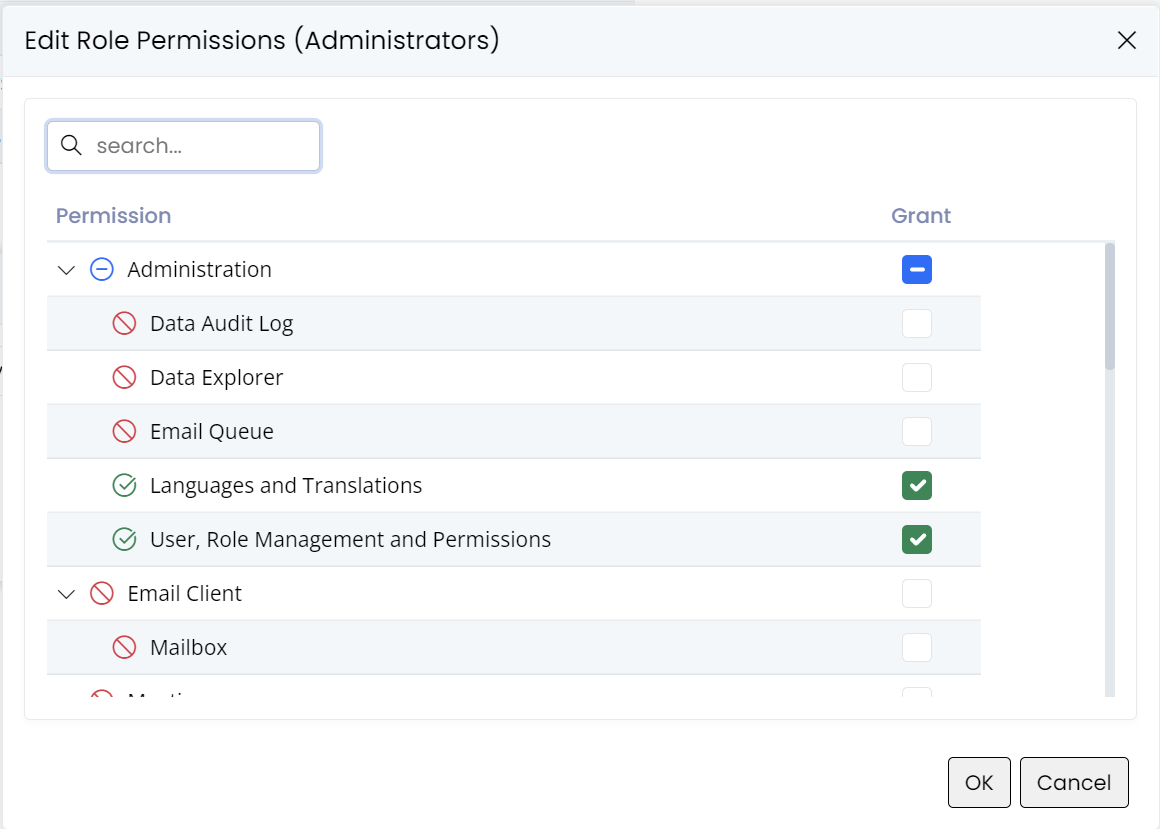
In the screen above we see the textual representations of the permission keys we talk about, but internally they correspond to the following free-form strings:
"Administration:DataAuditLog""Administration:DataExplorer""Administration:EmailQueue""Administration:Translation""Administration:Security"
Declarative Permission Attributes
Serenity has several permission attributes which declaratively determine the required permission key to perform particular actions:
- DeletePermissionAttribute
- ModifyPermissionAttribute
- NavigationPermissionAttribute
- ReadPermissionAttribute
- ServiceLookupPermissionAttribute
- UpdatePermissionAttribute
These permission attributes are assigned to various resource types like entities:
    [ReadPermission("Administration:Security")]
    [ModifyPermission("Administration:Security")]
    [LookupScript(Permission = "Administration:Security")]
    public sealed class UserRow
    {
        // ...
    }
In the example above, the read, modify, and lookup permissions for the User entity are assigned as "Administration:Security".
If, for example, we wanted to assign different permissions for creating, updating, and deleting a user:
    [ReadPermission("Administration:User:Read")]
    [InsertPermission("Administration:User:Insert")]
    [UpdatePermission("Administration:User:Update")]
    [InsertPermission("Administration:User:Delete")]
    [LookupScript(Permission = "Administration:Security")]
    public sealed class UserRow
    {
        // ...
    }
Having the ability for fine-grained permissions does not always mean you should use them. We don't recommend defining/assigning different permissions for every type of entity and every type of action as it would make managing and maintaining them very difficult.
The usual rule of thumb is, don't introduce a new permission key unless there is an actual need for such fine-grained control.
For example, in Serene, we assigned the "Administration:Security" permission for both the User and Role entities and several other operations. Before assigning them individual permission keys, you should ask yourself if there is an actual business requirement for an administrator to manage only Roles, while another administrator manages only Users. If yes, define separate permissions, if not wait until you need it.
This is the same for Insert/Update/Delete permissions. Do you need an administrator to only create users, another to only update them, and another admin to only delete them?
Permission Key Definitions
Permission keys themselves are usually defined in a static class:
namespace Serene.Administration
{
    [NestedPermissionKeys]
    [DisplayName("Administration")]
    public class PermissionKeys
    {
        [Description("User, Role Management and Permissions")]
        public const string Security = "Administration:Security";

        [Description("Languages and Translations")]
        public const string Translation = "Administration:Translation";
    }
}
Even though this is not mandatory, it is common practice and is recommended to make it easier to access them via intelli-sense, determine their display names, and avoid typing errors.
Authorization Attributes for Actions
To make it easy to validate permissions we provide some attributes in addition to the built-in ASP.NET [Authorize] attribute.
They have overloads that accept a permission key parameter, which automatically validates the permission.
Difference between the two lies in the way they handle unauthenticated access attempts. While the [PageAuthorize] attribute throws an exception, [ServiceAuthorize] provides an AJAX call-friendly service error.
There are also specialized versions of the ServiceAuthorize attribute that reads the permission key from the target type (usually an entity/row type) by checking a set of permission attributes, using the first one the target type has:
- AuthorizeCreateAttribute:
Insert,Modify, orReadpermission attributes. - AuthorizeDeleteAttribute:
Delete,Modify, orReadpermission attributes. - AuthorizeListAttribute:
ReadorServiceLookuppermission attributes. - AuthorizeUpdateAttribute:
Update,Modify, orReadpermission attributes.
Permission Expressions
By default a permission check (e.g. IPermissionService.HasPermission) takes a single permission key. When you need to require a combination of permissions, you can enable logical permission expressions with LogicOperatorPermissionService, which decorates an IPermissionService in the DI container:
services.AddSingleton<IPermissionService>(serviceProvider =>
    new LogicOperatorPermissionService(serviceProvider.GetRequiredService<BasePermissionService>()));
Once registered, HasPermission accepts logical expressions that support the operators ! (not), & (and), | (or), and parentheses:
"Administration:Security & Administration:Translation"— the user must have both."Administration:Security | Administration:Translation"— the user must have either."!Administration:Security"— the user must not have the permission."(Administration:Security & Administration:Translation) | Administration:User:Read"— grouped expressions.
The parsing and evaluation is handled by PermissionExpressionParser, which tokenizes the expression, converts the tokens to Reverse Polish Notation (shunting-yard), and evaluates them against the wrapped permission service. The result is cached, so repeated checks of the same expression are cheap.
When a permission string contains none of the operator characters,
LogicOperatorPermissionServicedelegates directly to the inner service, so plain keys behave exactly as before.
Impersonation
- The
IImpersonatorinterface and its default implementation ImpersonatingUserAccessor class provide an option to execute an action as if another user is currently logged in.
This can be useful to call a service that requires special permissions in the context of an admin or another privileged user, while a user with a more limited set of permissions is logged in.
ImpersonatingUserAccessor wraps any class implementing the IUserAccessor interface and adds an impersonation ability to that.
The template's AppServices.UserAccessor (in Modules/Common/AppServices/UserAccessor.cs, namespace {ProjectName}.AppServices) implements both IUserAccessor and IImpersonator out of the box, so no wrapping registration is required.
Then anywhere you need temporary impersonation, you should cast the IUserAccessor service to IImpersonator:
public class SomeHandler : IRequestHandler
{
    private IUserAccessor userAccessor;

    public SomeHandler(IUserAccessor userAccessor)
    {
        this.userAccessor = userAccessor ??
            throw new ArgumentNullException(nameof(userAccessor));
    }

    public void SomeMethod()
    {
        var impersonator = (IImpersonator)userAccessor;

        // lets say current user is "test" here
        impersonator.Impersonate("admin");
        try
        {
            // here current user is "admin"
            PerformSomeOperationAsAdmin();
        }
        finally
        {
            impersonator.UndoImpersonate();
        }
        // here current user becomes "test" again
    }
}
Login As (also called impersonation)
StartSharp also provides an option to log in as (e.g. impersonate) another user on the user administration page:
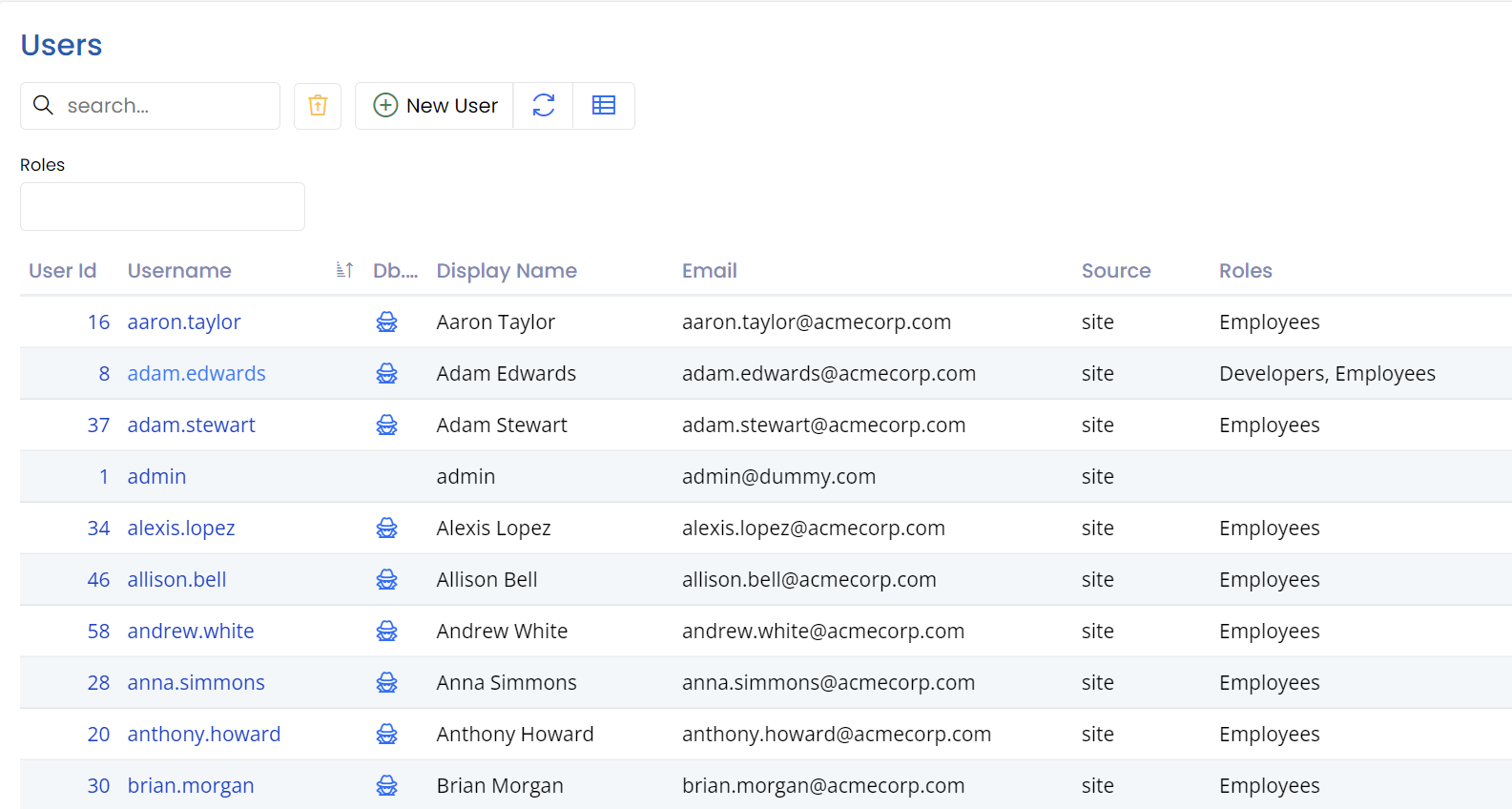
By default, only the super admin (e.g. admin user) can perform this action.
You may right-click the spy icon next to a username, and use the open-in new incognito window menu item.
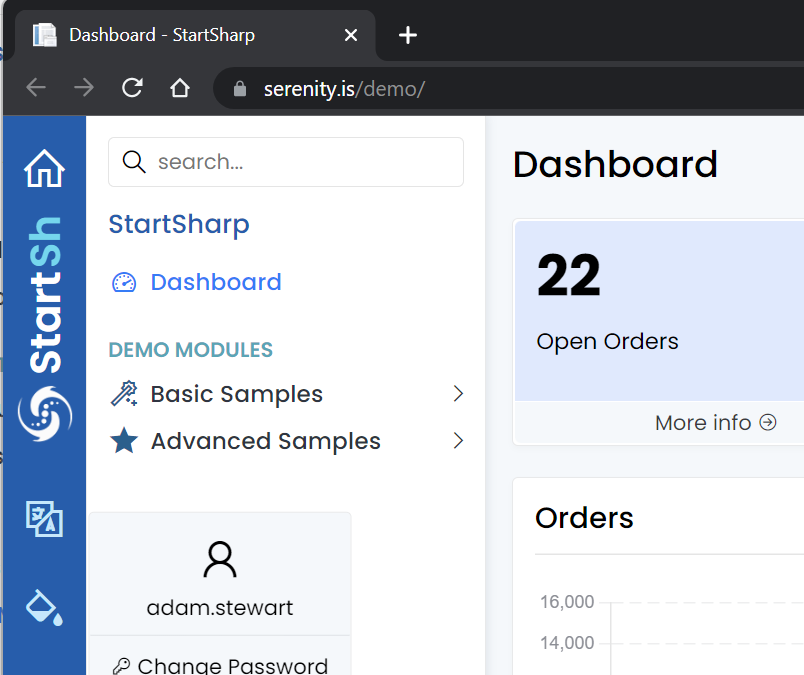
We don't allow opening in the same browser window, as this would effectively mean signing the current user out.
Transiently Granting Permissions
Sometimes it would be better to temporarily (e.g. transiently) grant a user some permissions instead of impersonating an admin. ITransientGrantor interface and its default implementation TransientGrantingPermissionService can do just that.
The template's AppServices.PermissionService (in Modules/Common/AppServices/PermissionService.cs) already has built-in transient-grant support: it derives from BasePermissionService, which implements IPermissionService and ITransientGrantor. No wrapping registration is required.
Then you can use it in a similar way to impersonation:
public class SomeHandler : IRequestHandler
{
    private IPermissionService permissions;

    public SomeHandler(IPermissionService permissions)
    {
        this.permissions = permissions ??
            throw new ArgumentNullException(nameof(permissions));
    }

    public void SomeMethod()
    {
        var transientGrantor = (ITransientGrantor)permissions;

        transientGrantor.Grant("Administration:Security");
        try
        {
            // here the current user temporarily has
            // "Administration:Security" permission
            PerformSomeOperationAsAdmin();
        }
        finally
        {
            transientGrantor.UndoGrant();
        }
        // here no longer
    }
}
Please note that granting temporary permission is performed in memory and is not stored anywhere.
Account Elevation
Some operations are sensitive enough that they should require the user to re-confirm their password, even when they are already signed in — a step-up or elevation requirement. Examples include linking or unlinking an account, enabling two-factor authentication, or managing users.
The feature is built on a few types in the Extensions packages:
RequiresElevationAttribute(inSerenity.Web) — an action filter you place on a page action, a controller, or a service endpoint method. When the request has no valid elevation token it either redirects the user to the elevation page (for GET requests) or throws aRequiresElevationValidationError(for non-GET requests).IElevationHandler(inSerenity.Abstractions) — the abstraction behind the feature:AppendElevationTokenToCookies(),ValidateElevationToken(), andDeleteToken().DefaultElevationHandler(inSerenity.Extensions) — the default implementation, which issues a short-lived token stored in an HttpOnly cookie. Register it withAddElevationHandler().AccountElevationPageBase(inSerenity.Pro.Extensions) — a base controller that renders the page where the user enters their password to confirm access and, on success, appends the elevation token.
Note: The elevation UI — the
AccountElevationPageBasecontroller and the page where the user re-enters their password — is provided by Serenity.Pro.Extensions, a premium package. This means the elevation feature is available in StartSharp but not in Serene (the free, open-source template). TheRequiresElevationAttribute/IElevationHandler/DefaultElevationHandlerbase types are available generally, but in a Serene app you'd need to provide your own elevation page to use them end-to-end.
To use elevation in a StartSharp application, see Account Elevation.
Throttler
Throttler limits the rate of an operation — for example, allowing only a certain number of login attempts within a time window. It counts attempts in a sliding window backed by either IMemoryCache or IDistributedCache.
Construct it with a cache, a key identifying the throttled resource (e.g. a username), a duration, and a limit:
var throttler = new Throttler(cache.Memory,
    "ValidateUser:" + username.ToLowerInvariant(),
    TimeSpan.FromMinutes(30), 50);

if (!throttler.Check())
    throw new ValidationError("Too many login attempts. Please try again later.");
Check()records an attempt and returnstrueif it is within the limit, orfalseif the limit has been exceeded.Reset()clears the throttling state for the key (used after a successful login).DurationandLimitare available as properties, andCacheKeyexposes the combined cache key.
StartSharp and Serene use this in their UserPasswordValidator to block brute-force login attempts (30-minute window, 50 attempts per username).