Serenity 9.2.0 Release Notes (2025-11-24)
Note: This is the last version targeting .NET 8. Future versions (starting 10.0.0) require .NET 10 and Visual Studio 2026.
These release notes detail the significant changes made in version 9.2.0. For a complete list of changes, please refer to the Serenity Change Log.
Content Security Policy (CSP) Support
We have made significant improvements to support Content Security Policy (CSP) headers. While most modern applications use CSP to prevent XSS attacks, implementing it has been challenging with Serenity due to inline styles and scripts used by some components.
styleNonce Option for SleekGrid
SleekGrid now supports a styleNonce option in its constructor for stricter CSP directives. If not passed explicitly, it will automatically look up a nonce value from:
- A
<meta name="csp-nonce">element in the document head, or - A
<script>or<style>element with anonceattribute in the document head.
const grid = new SleekGrid(container, columns, options, {
    styleNonce: "random-nonce-value"
});
Replaced Inline Style Attributes
We replaced inline style attributes across the codebase to support stricter CSP directives. Components like dialogs, block UI, select2, filter panels, property grids, and various sample pages have been updated to use CSS classes instead of inline styles.
The one remaining exception is CKEditor 4, which inherently requires unsafe-inline for styles. This is one of the reasons we are moving toward Tiptap as the default HTML editor (see below).
Recommended JSX Style for Inline Styles
When an inline style is assigned directly via the style attribute as a string, it may create a CSP issue, whereas assigning it as an object won't:
// CSP issue
<div style="font-weight: bold; display: inline-block;" />

// No CSP issue
<div style={{ fontWeight: "bold", display: "inline-block" }} />
It is recommended to avoid inline style assignment as a string even if you don't enable CSP.
New CSP Directive Helpers
We added helper methods to HtmlScriptExtensions that make it easier to manage CSP directives both from the layout and per specific pages:
// In _LayoutHead.cshtml:
<meta http-equiv="Content-Security-Policy" content="
    @Html.GetCspDirective("base-uri", "self")
    @Html.GetCspDirective("default-src", "self")
    @Html.GetCspDirective("img-src", "data:", "https:", "self")
    @Html.GetCspDirective("font-src", "self", "https://fonts.gstatic.com")
    @Html.GetCspDirective("script-src", "self")
    @Html.GetCspDirective("style-src", "self")
    @Html.GetCspDirective("connect-src", "self", "http:", "ws:", "wss:")" />
Html.CspNonce() now optionally accepts an addDirectives parameter (default true) that automatically adds script-src and style-src nonce directives:
@{
    var nonce = Html.CspNonce(); // adds 'nonce-{value}' to script-src and style-src
}
Html.AddCspDirective() allows adding directives from specific pages. For example, the EmailClient page adds CKEditor-compatible directives:
@{
    // has to be added here because of the CKEditor that is used in email editor
    Html.AddCspDirective("style-src", "unsafe-inline", "https://cdnjs.cloudflare.com/ajax/libs/ckeditor/");
    Html.AddCspDirective("script-src", "unsafe-inline", "https://cdnjs.cloudflare.com/ajax/libs/ckeditor/");
}
Values that consist only of alphanumeric characters, hyphens, and underscores are automatically quoted (e.g., self becomes 'self'). If unsafe-inline is present in a directive, any nonce or hash values are automatically removed to avoid CSP ignoring the unsafe-inline directive.
Html.GetCspDirective() retrieves the accumulated CSP directive string, merging any manually specified values with ones added via AddCspDirective. The result is HTML-attribute-encoded and includes the trailing semicolon.
CSP Enabled by Default (StartSharp)
The CSP meta tag is now enabled by default in _LayoutHead.cshtml using the new helper methods, instead of being commented out:
<meta http-equiv="Content-Security-Policy" content="
    @Html.GetCspDirective("base-uri", "self")
    @Html.GetCspDirective("default-src", "self")
    @Html.GetCspDirective("img-src", "data:", "https:", "self")
    @Html.GetCspDirective("font-src", "self", "https://fonts.gstatic.com")
    @Html.GetCspDirective("script-src", "self")
    @Html.GetCspDirective("style-src", "self")
    @Html.GetCspDirective("connect-src", "self", "http:", "ws:", "wss:")" />
AddCspDirective Overloads (9.2.1)
We added AddCspDirective overloads for ControllerBase and HttpContext to provide more flexibility in adding CSP directives from controllers and middleware.
Tiptap Editor Integration (StartSharp)
We have configured HtmlNoteContentEditor and HtmlReportContentEditor to use Tiptap instead of CKEditor by default. Tiptap is a modern, framework-agnostic rich text editor based on ProseMirror, and it is fully compatible with strict CSP directives.
Configuration
Tiptap is configured in Modules/Common/script-init/tiptap-init.ts:
import { HtmlContentEditor, HtmlNoteContentEditor, HtmlReportContentEditor } from "@serenity-is/corelib";

HtmlContentEditor.tiptapModule = () => import("../dynamic-module/tiptap-module.mjs");
HtmlNoteContentEditor.defaultEditorProvider = "tiptap";
HtmlReportContentEditor.defaultEditorProvider = "tiptap";
Note that the initialization code above still keeps CKEditor as the default for HtmlContentEditor, as some features like the email client, email compose dialog, etc. might still require features provided by CKEditor. If you test it and confirm that it is not an issue for your environment, you may also set the default to tiptap:
HtmlContentEditor.defaultEditorProvider = "tiptap";
The Tiptap module is loaded dynamically and exposes various extensions via tiptap-module.mts:
export * from '@tiptap/core';
export * from "@tiptap/extension-file-handler";
export * from "@tiptap/extension-image";
export * from "@tiptap/extension-subscript";
export * from "@tiptap/extension-superscript";
// ... other extensions
CKEditor Deprecation
CKEditor 4 support is still available but is now opt-in. It will be removed in a future version as it is out-of-date and is not compatible with strict CSP. To use CKEditor for a specific editor instance, you can set the editorProvider option:
new HtmlContentEditor({
    editorProvider: "ckeditor",
    // ... other options
});
The getConfig method in HtmlContentEditor is now deprecated; use getCKEditorConfig instead.
New useUpdatableComputed Helper (DomWise)
We added a new useUpdatableComputed helper in @serenity-is/domwise to create a factory for computed signals that can be manually updated as a batch:
import { useUpdatableComputed } from "@serenity-is/domwise";

const { computed, update } = useUpdatableComputed();

const totalPrice = computed(() => {
    // This will re-evaluate when update() is called
    return items.value.reduce((sum, item) => sum + item.price * item.quantity, 0);
});

// Later, batch-update all computed values:
batch(() => {
    items.value.push(newItem);
    update(); // triggers recomputation of dependent computed signals
});
This is useful for computed signals that depend not only on other signals but on externally changing state. The HeaderMenuPlugin in StartSharp now uses this helper internally.
RTL and Column Improvements (SleekGrid)
CSS Variables for RTL
Instead of using separate sleek-vars.rtl and sleek-vars.ltr stylesheets, we now change the values of --l (left) and --r (right) CSS variables based on the document direction. This simplifies the CSS and makes it easier to support RTL layouts.
Increased Column Limit
The maximum number of supported columns in SleekGrid has been increased from 50 to 100, which should be sufficient for most use cases.
Enhanced Attribute System (9.1.5)
We enhanced the type system for JavaScript client-side attributes and interfaces:
CustomAttributebase class added for extensible attribute support and attribute typingAttributeSpecifierunion type introduced for flexible attribute specification (classes, instances, factories)registerClass,registerEditor, andregisterFormatternow handleAttributeSpecifier
You no longer need to call Attributes.factoryFunction() — the registration helper will call it automatically. This means you can pass attribute classes or references directly, and the factory is invoked behind the scenes:
// Before (still works — explicit factory call):
static [Symbol.typeInfo] = this.registerClass(
    "MyProject.MyModule.MyType", [Attributes.panel()]);

// After (factory called automatically):
static [Symbol.typeInfo] = this.registerClass(
    "MyProject.MyModule.MyType", [Attributes.panel]);
Similarly, calling new SomeAttributeClass() is no longer necessary — you can pass the class reference directly:
// Both work the same now, the second is preferred:
[new PanelAttribute(true)]
[PanelAttribute]
New Column Picker Dialog (9.1.4)
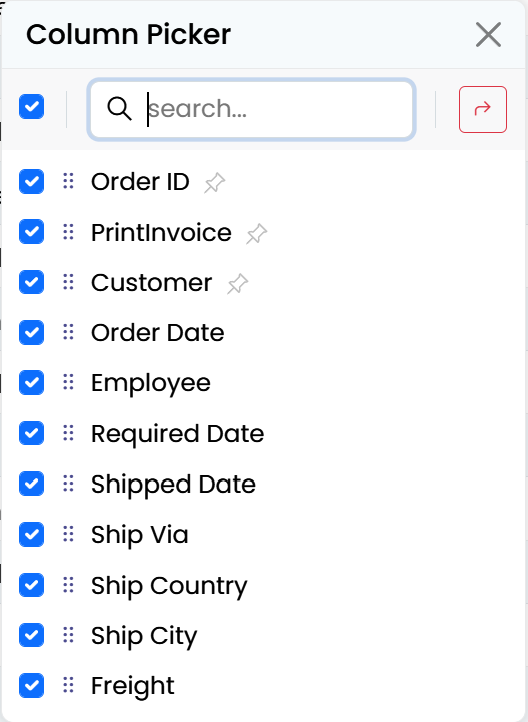
The Column Picker Dialog has been completely redesigned. Instead of a split view with visible/hidden column lists, it now has a unified column list with checkboxes to toggle visibility:
Key improvements:
- Single list with checkboxes instead of two separate lists
- Real-time changes — changes are applied as soon as a checkbox is clicked or columns are dragged
- Works with raw SleekGrid or any other component with columns, as long as necessary callbacks are provided
- Improved "Toggle All" handling — only one populate operation is necessary when multiple columns are shown (9.1.6)
- Better search/reset separation (9.1.4)
SleekGrid Event System Redesign (9.1.2)
The SleekGrid event system has been redesigned to resolve issues that occurred when jQuery was loaded on the same page.
Previously, all event arguments were passed through a single e argument. Now, only a subset of commonly used Args properties (such as grid, column, row, cell) are passed directly through the event argument, while the rest can be accessed via a second args parameter or e.args:
grid.onColumnsResized.subscribe((e) => {
    // e contains grid, column, row, cell etc.
    // Additional properties can be accessed via e.args
    const allColumns = e.args.columns;
});
If you have custom event handlers that access non-standard event properties, you may need to update them to use e.args instead.
PromptDialog Improvements (9.1.1)
PromptDialog now has two new options:
submitOnEnter(defaulttrue) — submits the dialog when Enter is pressedcloseOnEscape(defaulttrue) — closes the dialog when Escape is pressed
These can be modified globally via PromptDialog.defaultOptions:
PromptDialog.defaultOptions.submitOnEnter = true;
PromptDialog.defaultOptions.closeOnEscape = true;
You can also access the editor directly via the new getEditor method:
const dialog = new PromptDialog({});
const editor = dialog.getEditor();
editor.value = "Some default text";
Persistence Flags (9.1.6)
The persistence system now stores the used persistence flags in the persisted grid settings. This allows the grid to correctly restore settings even when the available persistence flags differ between versions.
HeaderFiltersPlugin Enhancements (9.1.0)
getFilterText Option
HeaderFiltersPlugin now supports a getFilterText option to override the displayed filter value. This is useful when you want to show a formatted version of the filter value:
HeaderFiltersMixin.create(container, {
    // ...
    getFilterText: (item) => {
        if (item.type === HeaderFilterType.DateRange) {
            return `${item.dateFrom} - ${item.dateTo}`;
        }
        return item.text;
    }
});
headerFilterChecked / headerFilterUnchecked
Instead of a single headerFilterValues array, columns now have headerFilterChecked and headerFilterUnchecked arrays for more precise control over which values are checked by default:
columns: [
    {
        field: "Country",
        headerFilterChecked: ["USA", "Canada"],
        headerFilterUnchecked: ["Mexico"],
    }
]
Formatter Purpose
Formatters now receive a purpose parameter when called for header filter rendering. The 'header-filter' purpose allows formatters to render differently in header filter dropdowns. The checkbox/boolean formatter has been updated with special handling for this purpose.
FormatterContext Helper (9.1.0)
A new formatterContext helper is available in SleekGrid that should be used instead of directly creating a formatter context. This helper will correctly set the sanitizer, escape, and other arguments based on global/grid options:
import { formatterContext } from "@serenity-is/sleekgrid";

const context = formatterContext(grid, column, item, row, cell);
const result = column.format(context);
The groupTotalsFormatter is now deprecated — use groupTotalsFormat instead, which accepts a FormatterContext just like column.format does.
bindThis Helper (9.1.0)
A new bindThis helper is available in @serenity-is/sleekdom to auto-bind class functions, avoiding the need for this.someFunction.bind(this) which creates a new function every time and makes event unsubscription difficult:
class MyClass extends Widget<any> {
    handleClick() {
        // 'this' is correctly bound
    }

    constructor() {
        const boundThis = bindThis(this);
        // boundThis is a proxy for "this" that lazily auto-binds
        // functions on first access and stores them on "this"
        this.element.addEventListener("click", boundThis.handleClick);
    }

    destroy() {
        // Works because the proxy already saved the bound version on "this"
        this.element.removeEventListener("click", this.handleClick);
    }
}
HTML Validation Improvements (9.1.6)
HTML Content Editor Validation
The HTML content editor's validation handling has been improved. The validator now properly handles HTML content editors and validates them correctly even when they are in a hidden state.
[hidden] * Ignored by Validation
The validation system now ignores elements with a [hidden] attribute, just like it does for .hidden * elements. This ensures that hidden editors are not validated.
Other Notable Changes
Last .NET 8 Version
9.2.0 is the last version targeting .NET 8. Only critical bug fixes may be released from the net8 branch as 9.2.x patches. Version 10.0.0 requires .NET 10 and Visual Studio 2026.
IRemoteView.getFilteredItems (9.1.6)
IRemoteView now has a getFilteredItems method, and redundant comments have been removed from RemoteView methods that already have comments in the interface.
Login Page 2FA Improvements (StartSharp, 9.1.1)
The login page's two-factor authentication code entry experience has been improved, with better UI for entering codes and improved error handling.
AutoNumeric Options
Known options from editor options are now passed through to the AutoNumeric instance from integer/decimal editors.
Package Updates
Updated NPM packages:
@preact/signalsto 2.5.0globto 12.0.0vitestto 4.0.10jsdomto 27.2.0datatablesto 2.3.5
Bugfixes
- Tree toggle with HTML rendering disabled: Fixed a potential issue with
SlickFormatting.treeTogglewhen the formatter returns a string andenableHtmlRenderingisfalse. Updated the default comment inFormatterContext.enableHtmlRendering. - Null flags in persistence: Fixed null flags issue when restoring persisted grid settings (9.1.7).
- Grid radio selection mixin: Fixed an issue where
GridRadioSelectionMixinwas using an HTML string incorrectly (9.1.6). - Input focus in grid: Fixed a wrong
isImmediatePropagationStoppedcheck inonDragInitthat was preventing inputs from getting focus in the grid (9.1.5). - asyncPostProcess setTimeout: Fixed a potential
thisissue insetTimeoutforasyncPostProcess(9.1.5). - Actions dropdown visibility: Fixed an issue where the actions dropdown was hidden due to
.slick-cellhaving az-indexvalue inslick.base.css(9.1.4). - Header menu
thiscontext: Fixed some actions in the header menu failing due to losing thethiscontext when callingpreventDefault(9.1.4). - Sergen System.Data.Common reference: Fixed an issue with
System.Data.Commonreference insergen g(9.1.3). - Serene Translation page formatters: Converted formatters in the Serene Translation page to JSX syntax as HTML strings are no longer supported by default (9.1.2).
- Quick filter params: Added coalesce to
quickFilterParamsasObject.assignfails when it isnull(9.1.2). - CSP sample pages: Fixed remaining discovered CSP-related issues in sample pages (9.2.1).
Upgrading to 9.2.0
- Update the Serenity submodule to the 9.2.0 commit (
8114dd702a1fca350a41f320a3495226e94d2d3f) - Update NuGet packages to 9.2.0
- Update npm packages:
@serenity-is/tsbuildto 9.1.6
- If you use
HtmlNoteContentEditororHtmlReportContentEditor, review the new Tiptap configuration (seetiptap-init.tsin the latest template) - If you use CSP, review the new CSP helper methods and the enabled CSP meta tag in
_LayoutHead.cshtml - If you have custom code that directly references the old SleekGrid event argument structure, update it to use the new
e.argspattern where needed - Remove any calls to
Attributes.factoryFunction()— they are no longer needed